Salesforce supplier portal for an automotive manufacturer in Pune
Large automotive manufacturers often work with hundreds of component suppliers through email, spreadsheets and phone calls. This is how we'd implement Salesforce as one supplier portal for onboarding, purchase orders, delivery schedules and quality issues, connected to SAP.
Industry
Automotive manufacturing
Typical timeline
14–18 weeks
Typical team
6 people

The situation
Picture an automotive component manufacturer near Pune, with plants in Chakan and Ranjangaon, supplying brakes and chassis parts to vehicle makers. It buys from around 300 tier-two suppliers: castings, forgings, fasteners, rubber parts and packaging.
The relationship with those suppliers runs on email and Excel. Delivery schedules change every week as customer line plans change, and buyers send revised schedules as spreadsheets. Suppliers reply when they can, often by phone. Buyers then retype confirmations into SAP. Quality problems are handled through 8D reports passed around as Word files, and nobody can say quickly how many are open or overdue. Supplier certificates, such as IATF 16949 and ISO 14001, expire without anyone noticing until an audit.
SAP is the system of record and should stay that way. What's missing is one shared place where suppliers see what's needed from them, reply in a structured way, and where the buying and quality teams see the status of every supplier at a glance.
Signs this blueprint fits you
- Buyers spend hours each week chasing schedule confirmations by email and phone.
- You can't easily see which suppliers are late to confirm or late to deliver.
- 8D reports and corrective actions live in email threads and shared drives.
- Supplier onboarding and certificate tracking are manual.
What we'd build
- A supplier portal on Experience Cloud, branded for your company, where each supplier's users see only their own parts, orders and issues.
- Supplier 360 in Salesforce: one record per supplier with contacts, plants, commodities, certificates and performance history.
- Purchase orders and delivery schedules synced from SAP, with structured confirm, split and comment actions for suppliers.
- Quality issue management following the 8D steps, with containment, root cause and corrective action dates tracked per issue.
- Integration with SAP S/4HANA through middleware, so schedules flow out and confirmations flow back without retyping.
- Dashboards for buyers and supplier quality engineers: confirmations pending, on-time delivery, open 8Ds, certificates expiring.
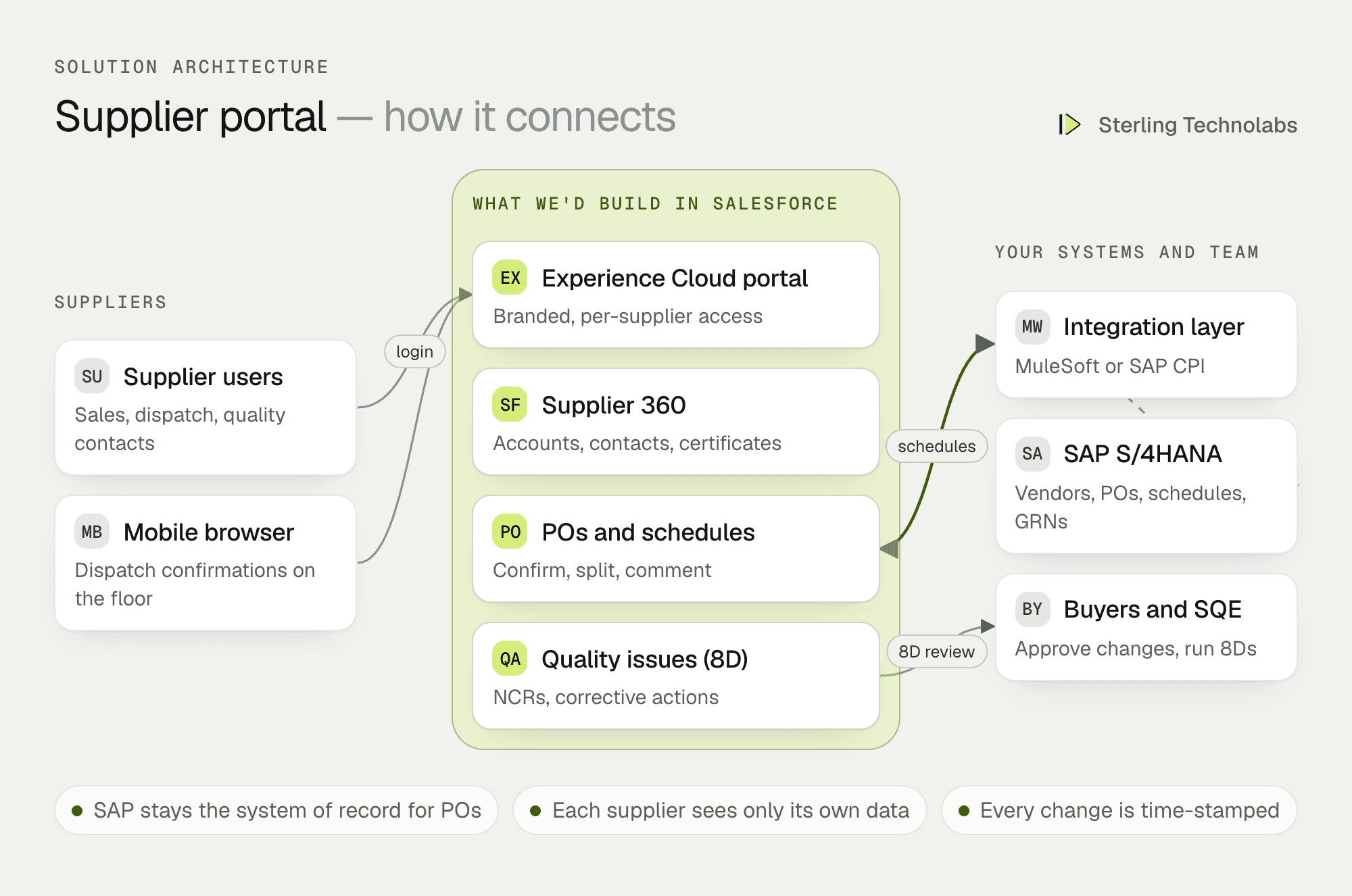
How the pieces fit
Salesforce as the collaboration layer, SAP as the record
We don't move purchasing out of SAP. Vendors, POs and schedule agreements are created in SAP as today and synced to Salesforce. Suppliers act on them in the portal, and their confirmations are written back to SAP for MRP to use. This keeps finance and planning exactly where they are while giving suppliers and buyers a much better way to work together.
The portal
Experience Cloud gives each supplier user a login, and sharing rules ensure they only see records for their own company. Dispatch staff can confirm schedules from a phone on the shop floor. The portal can also host supplier onboarding forms, certificate uploads and a document library for drawings and specifications.
Integration
SAP and Salesforce are connected through middleware, MuleSoft or SAP Integration Suite, depending on what you already license. Vendors and POs sync on change; schedule lines sync whenever MRP releases a new version; confirmations go back within a minute. Every message is logged so mismatches can be traced.
Quality
Each quality issue becomes a record with the 8D steps as stages. Suppliers fill in containment and root cause in the portal, attach evidence, and the supplier quality engineer approves each step. Overdue steps trigger reminders and show up on the dashboard.
One schedule change, end to end
Here is a mid-week increase in a schedule, traced from SAP to the supplier and back.
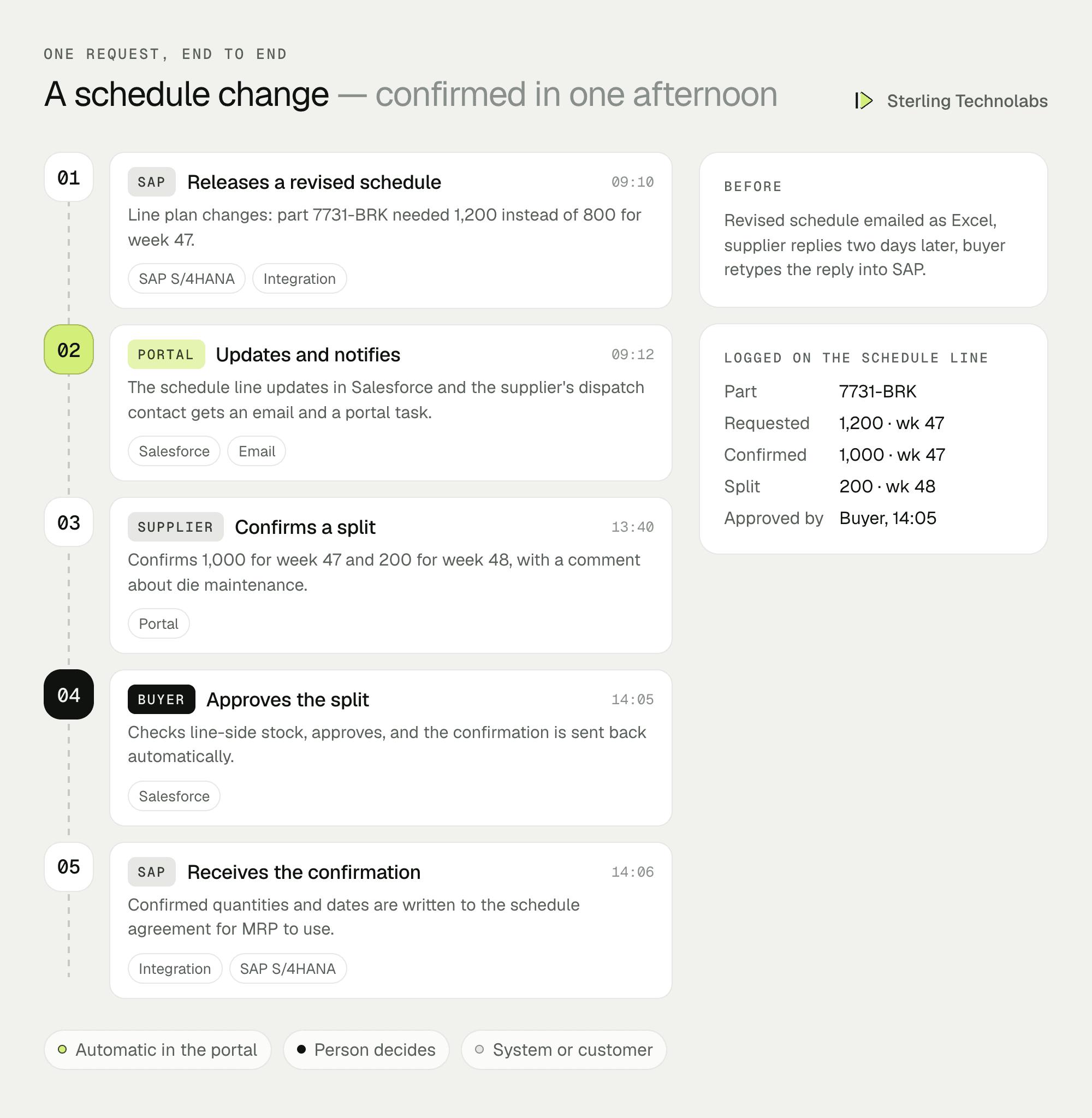
The supplier can't meet the full increase, which is the realistic case. Instead of a phone call that nobody records, the split and the reason are captured on the schedule line, the buyer decides with the right information, and SAP gets the confirmed quantities without anyone retyping them.
What suppliers would see
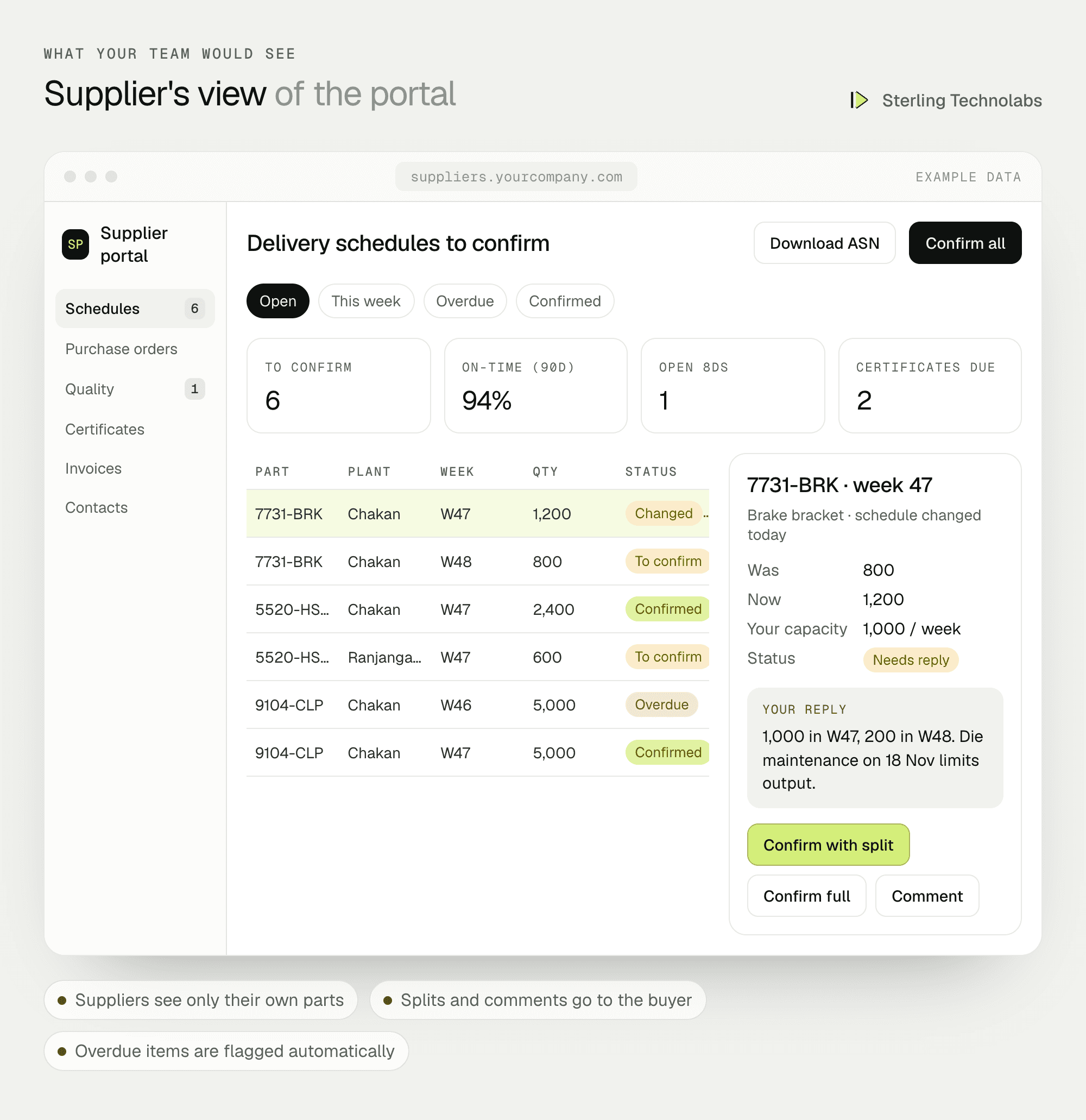
Suppliers open the portal to a short list of things that need their attention: schedules to confirm, overdue lines, open quality issues and certificates about to expire. Buyers see the same records from the other side, filtered by commodity and plant.
Data and integrations
| Object | System of record | Direction | When it syncs |
|---|---|---|---|
| Vendor master | SAP | SAP to Salesforce | On change |
| Purchase orders | SAP | SAP to Salesforce | On release |
| Delivery schedule lines | SAP | Both ways | On MRP release; confirmations back within a minute |
| Goods receipts | SAP | SAP to Salesforce | Hourly, for on-time delivery |
| Quality issues (8D) | Salesforce | Salesforce to SAP QM (optional) | On status change |
| Supplier certificates | Salesforce | Salesforce only | Not applicable |
Delivery plan
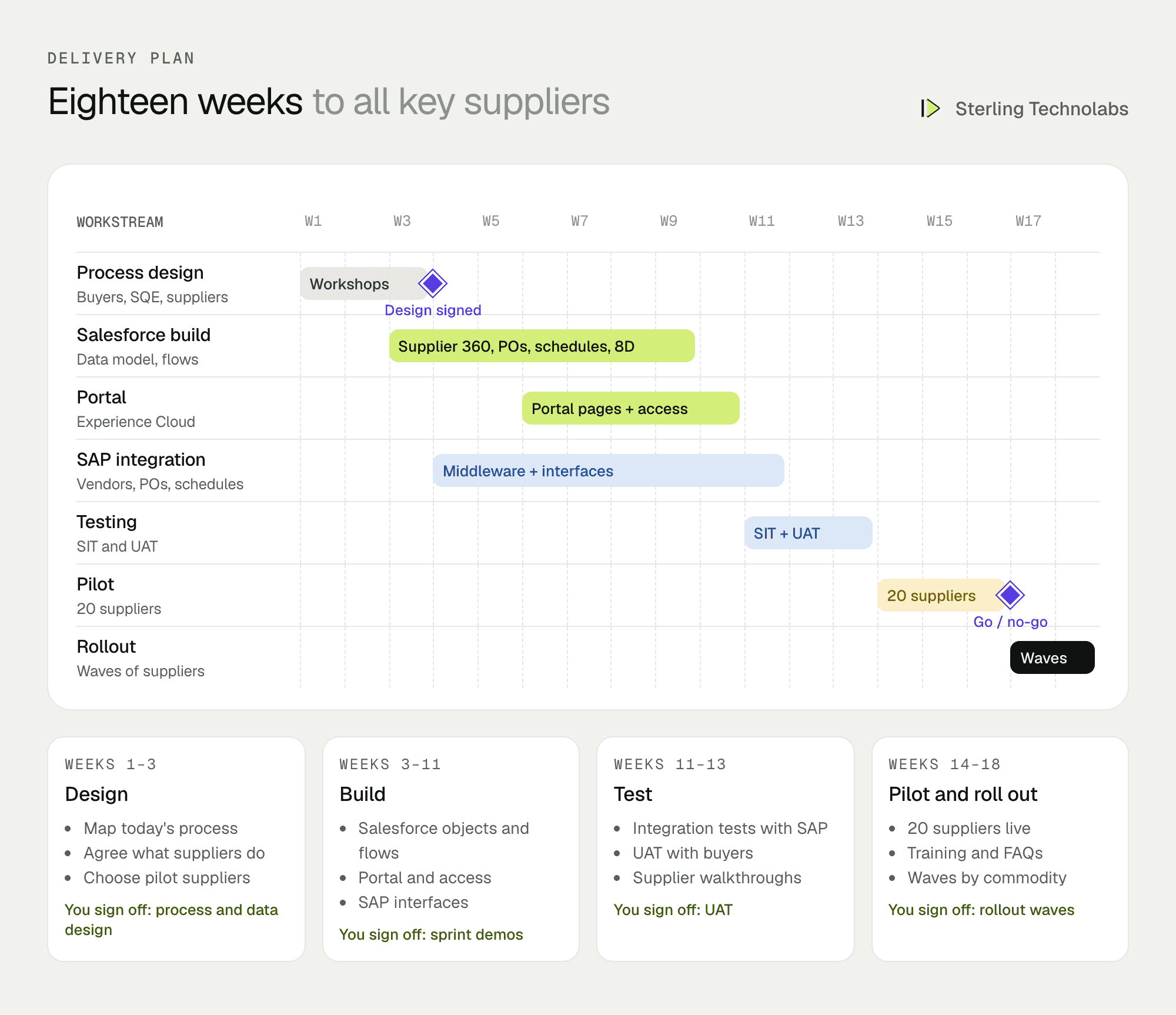
Supplier adoption decides whether a portal succeeds, so suppliers are involved from the design workshops onward. The pilot runs with about twenty suppliers across two commodities, chosen to include both large and small companies. Rollout then proceeds in waves by commodity, with short training sessions and a supplier FAQ.
The team
| Role | Time | What they own |
|---|---|---|
| Salesforce solution architect | Part time | Data model, sharing, integration design |
| Business analyst | Weeks 1–13 | Process workshops, user stories, UAT |
| Salesforce developers (2) | Full time | Objects, flows, Lightning Web Components, portal |
| Integration developer | Weeks 4–13 | Middleware flows, SAP interfaces, monitoring |
| QA engineer | Weeks 9–16 | Integration tests, UAT support, pilot issues |
From your side: a purchasing lead, a supplier quality lead, an SAP MM/QM consultant for interface specs, and a handful of pilot suppliers willing to give feedback.
What changes the effort
- Scope of supplier actions. Schedule confirmation alone is the smallest useful start. ASNs, invoices and PPAP add phases.
- Middleware. If MuleSoft or SAP Integration Suite is already in place, integration is faster.
- SAP customisation. Standard schedule agreements are simpler than heavily customised ones.
- Number of supplier users. This affects Experience Cloud licensing more than build effort.
- Languages. English is the baseline; Marathi or Hindi portal text adds translation and testing.
Risks and how we'd handle them
| Risk | What we'd do |
|---|---|
| Suppliers don't log in | Involve suppliers in design, keep tasks short, send clear email links, and make the portal the only way to confirm after a transition period. |
| SAP and Salesforce disagree | SAP stays the record for POs, every message is logged, and a reconciliation report runs daily. |
| A supplier sees another's data | Sharing rules tested with accounts from several suppliers before launch, and reviewed after every change. |
| Licensing costs grow | We size Experience Cloud licences to the actual number of supplier users and logins in the design phase. |
| Scope creep into full procurement | A clear phase one: schedules, quality and certificates. Sourcing and contracts are separate decisions. |
What we'd measure
| Metric | How we'd measure it | Baseline from |
|---|---|---|
| Schedule confirmation time | Time from SAP release to supplier confirmation | Sample of current email threads |
| On-time delivery | Goods receipt date versus confirmed date, per supplier | SAP goods receipt history |
| 8D cycle time | Issue opened to corrective action verified | Current 8D tracker |
| Portal adoption | Share of confirmations made in the portal | Zero today |
| Expired certificates | Suppliers with lapsed certificates on any day | Current certificate list |
Build or buy?
SAP Ariba and dedicated supplier collaboration tools cover much of this, and if you already license Ariba, extending it may be the right call. A Salesforce portal makes sense when you already use Salesforce for customers and want suppliers on the same platform, when you want to shape the supplier experience closely, or when you need quality and certificate workflows that fit how your SQE team actually works. It's a smaller step than a full procurement suite and can grow in phases.
Questions we'd ask on the first call
- How many active suppliers do you have, and which commodities cause the most chasing?
- How are delivery schedules shared and confirmed today?
- Which SAP version and middleware are you on?
- How are 8Ds and supplier certificates tracked now?
- Which suppliers would be willing to join a pilot?
FAQ
Do suppliers need a Salesforce licence?
They need Experience Cloud logins, which are priced separately from internal Salesforce licences and sized by number of users or logins.
Will this change our SAP processes?
Very little. POs and schedules are still created in SAP. The main change is that confirmations arrive through an interface instead of being typed in.
Can suppliers submit ASNs and invoices too?
Yes, in a later phase. Most manufacturers start with schedules and quality, where the chasing is worst, then add ASNs and invoices.
:: Typical stack
Salesforce Experience Cloud, Sales Cloud platform, Flow, Lightning Web Components, SAP integration via MuleSoft or middleware
:: Related service
Salesforce implementation
See the service

Send us your brief. We’ll help turn it into reality
A senior engineer replies within one business day with questions or a first plan: approach, team, timeline and estimate.
More blueprints like this


