Agentforce for service: case triage for a B2B software company
Many B2B software support teams spend their first hour every morning reading and routing new cases. This is how we'd use Agentforce in Service Cloud to triage cases, answer the routine ones from Knowledge and pass the rest to the right engineer with a summary.
Industry
B2B SaaS
Typical timeline
8–10 weeks
Typical team
4 people

The situation
Picture a B2B software company selling a logistics platform to mid-sized companies in India, the Middle East and the US. Its support team of fifteen runs on Service Cloud and handles around 400 new cases a week, by email, an in-app help widget and a customer portal.
Every morning starts the same way. Someone reads the overnight cases, works out which product area each belongs to, checks the customer's plan and SLA, sets a priority and assigns it. Half of the cases are how-to and configuration questions that a Knowledge article already answers. The rest need an engineer, who usually starts by re-reading the thread and searching for similar past cases. Enterprise customers with one-hour SLAs sometimes wait behind a queue of password resets.
The company already pays for Service Cloud and has a decent Knowledge base. What it needs is triage that happens the moment a case arrives, answers for the questions that don't need a person, and engineers who start every hard case with context rather than a blank screen.
Signs this blueprint fits you
- You run support on Service Cloud and have a Knowledge base worth using.
- Manual triage takes the first hour of every day.
- Priority and routing depend on who happens to read the case first.
- Engineers spend time finding context that's already somewhere in Salesforce.
What we'd build
- An Agentforce service agent with three topics: triage every new case, answer cases that Knowledge clearly covers, and escalate everything else with a summary.
- Agent actions built as Flows and Apex: look up the account's plan and entitlement, check open incidents, find similar past cases, set fields, create a linked Jira issue.
- Knowledge clean-up: merge duplicate articles, tag them by product area, and mark which ones are safe for the agent to send.
- Omni-Channel routing by skill, product area, tier and SLA, so the right engineer gets each case.
- Console changes that show the agent's summary, suggested article and similar cases at the top of every case.
- A test set and reports in Agentforce Testing Center and Service Cloud dashboards, so quality is measured before and after go-live.
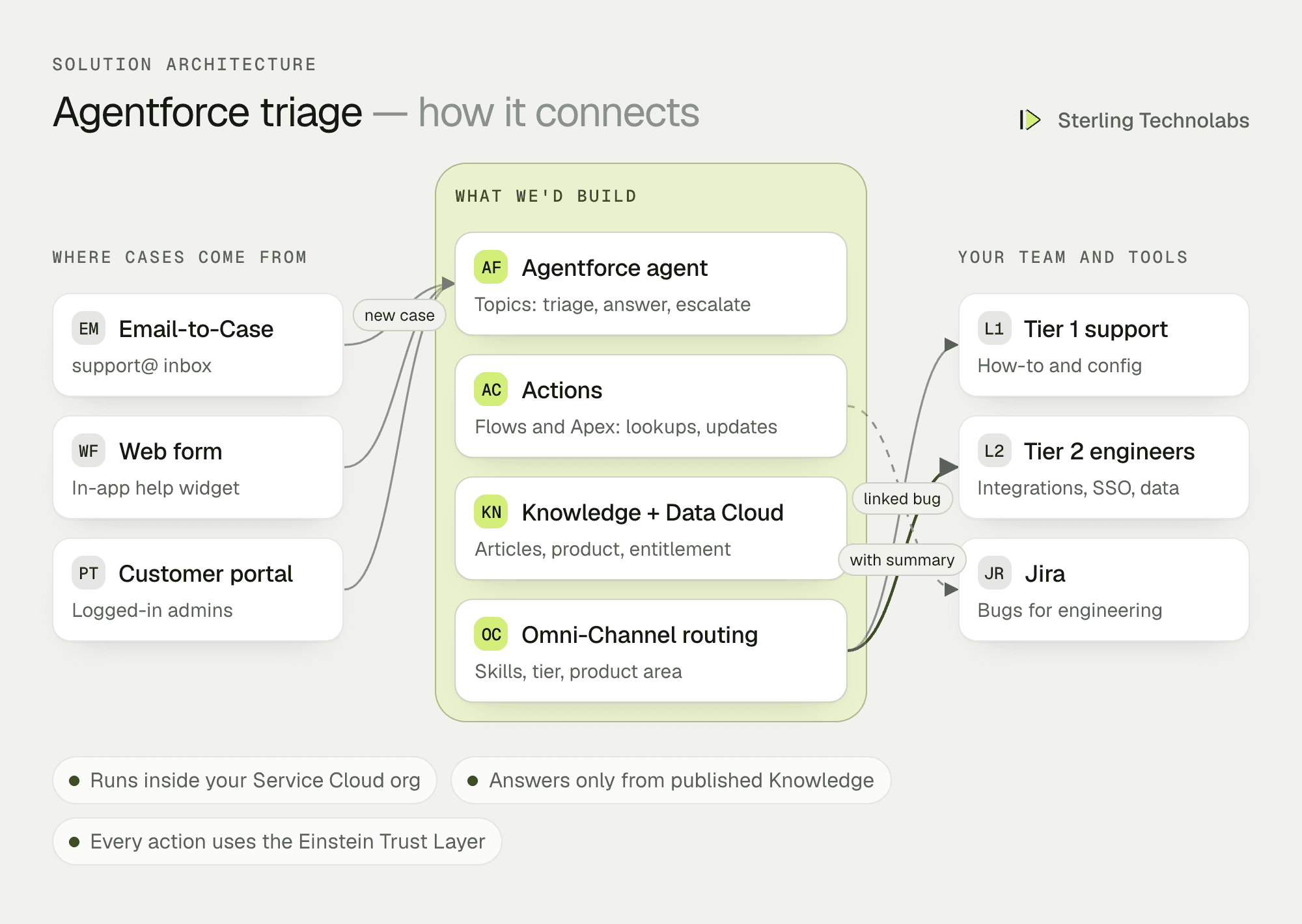
How the pieces fit
Topics and instructions
An Agentforce agent is organised into topics, each with its own instructions and allowed actions. Keeping triage, answering and escalation separate makes the agent predictable: the triage topic can set fields but never reply, the answer topic can reply only with published articles, and the escalation topic writes summaries for people.
Actions do the real work
The agent doesn't guess an account's SLA or a product's status. It calls actions that read them from Salesforce: entitlements, open incidents, similar cases, the customer's product configuration. Each action is a Flow or Apex class we write and test like any other code.
Grounding in your data
Answers come from Knowledge articles and, where useful, Data Cloud for product usage and account context. The Einstein Trust Layer handles masking of sensitive data and zero-retention with the model provider.
People stay in charge
The agent replies only for topics you approve, and only with articles marked safe. Everything else lands in an engineer's queue with a summary, the likely cause and links to similar cases. Engineers can override any field the agent set, and those overrides are reviewed weekly to improve the instructions.
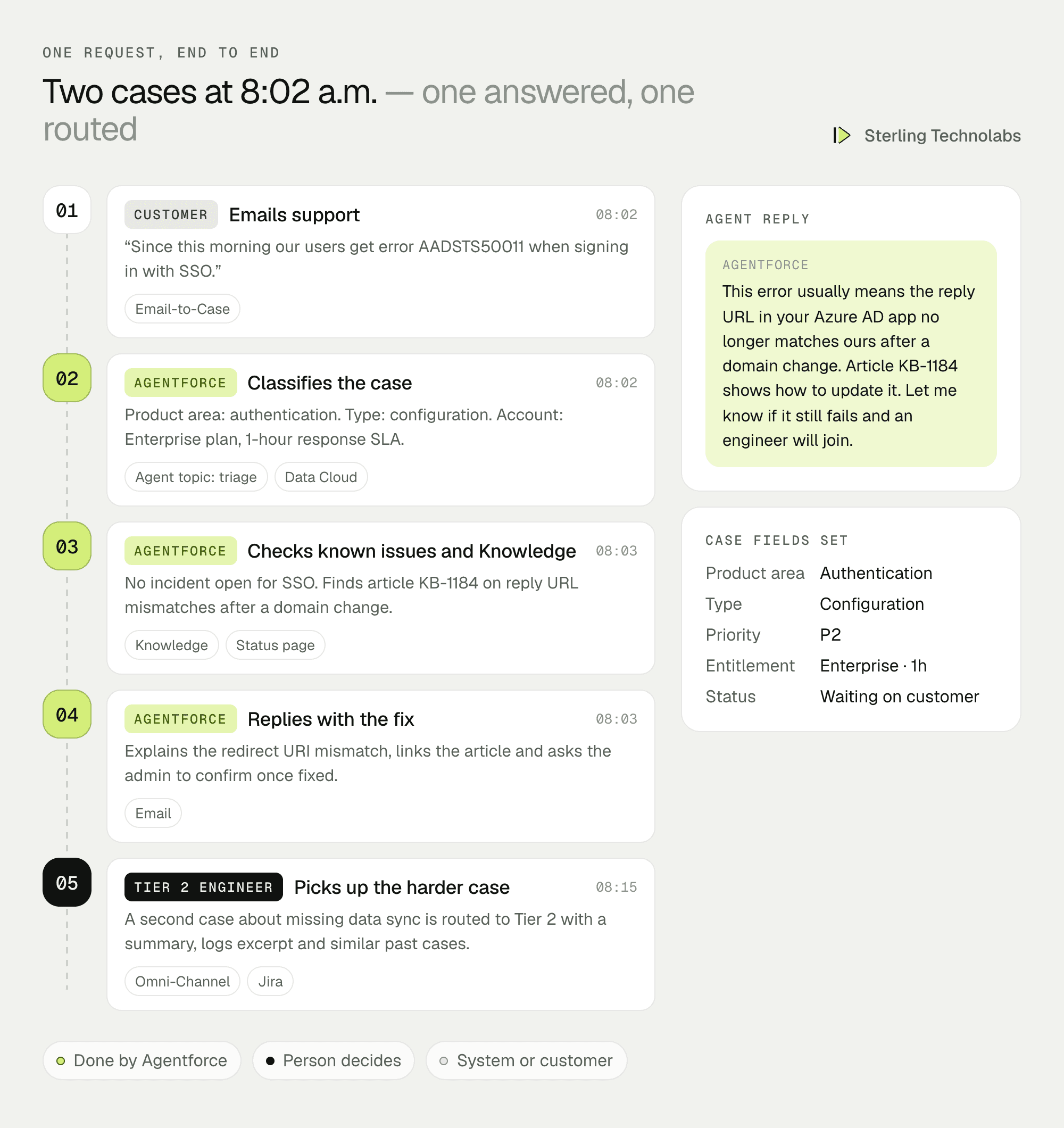
Two cases, end to end
Here are two cases from the same morning: one the agent answers on its own, one it routes to an engineer.
What your support team would see
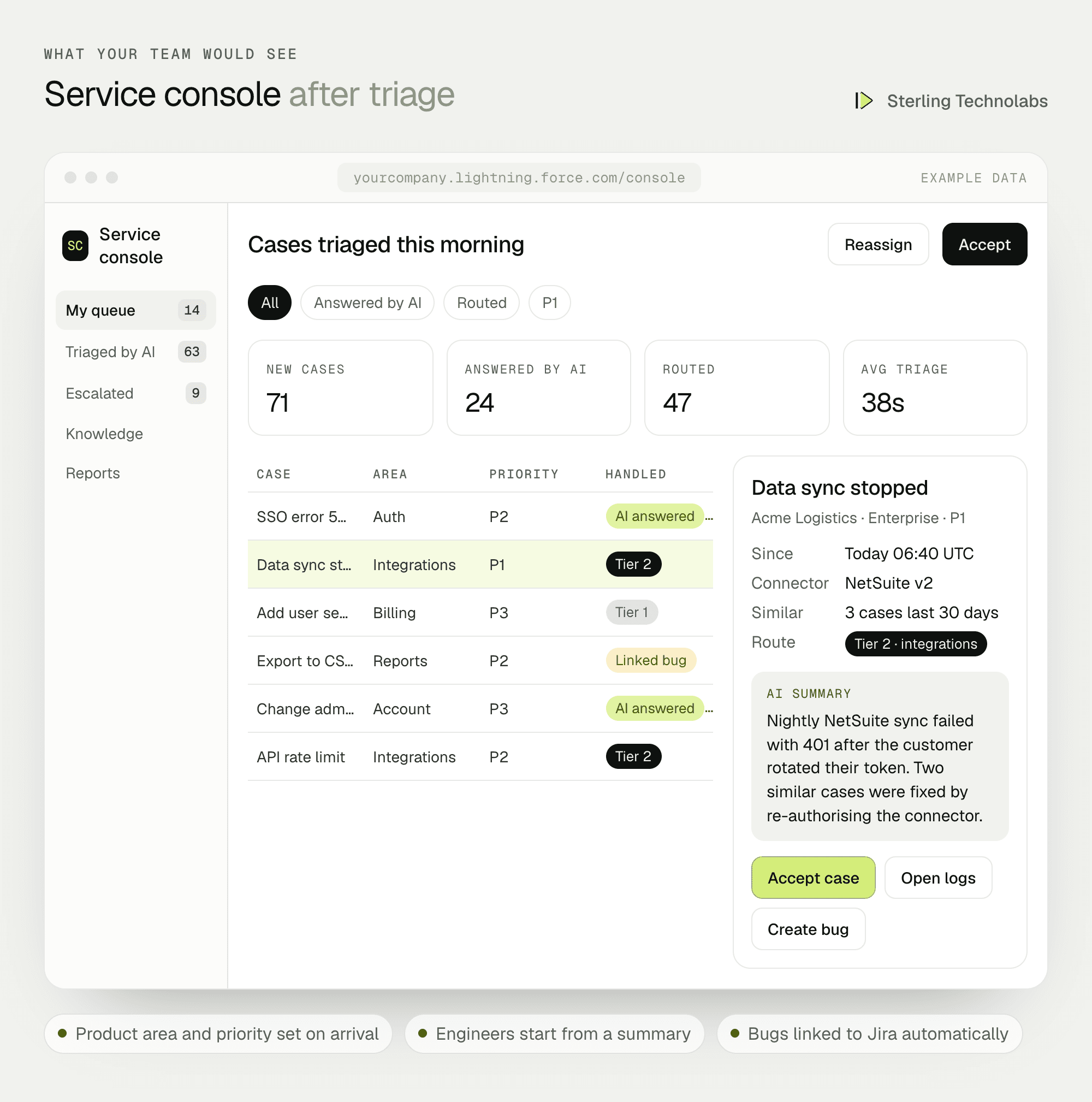
The console starts the day already sorted. Every new case has a product area, priority and route set, safe questions are already answered, and engineers open escalated cases to a summary instead of a long email thread.
What the agent may do
| Topic | The agent may | It may not |
|---|---|---|
| Triage | Set product area, type and priority; check entitlement; route | Reply to the customer |
| Answer | Reply with a published, safe-tagged article and a short explanation | Reply on P1 cases, billing disputes or anything about data loss |
| Escalate | Summarise, attach similar cases, create a linked Jira issue for suspected bugs | Close a case |
Data and integrations
| Source | What the agent uses | How we connect |
|---|---|---|
| Service Cloud | Cases, accounts, contacts, entitlements, case history | Native, through actions |
| Knowledge | Published articles tagged by product area and safety | Native grounding |
| Data Cloud (optional) | Product usage, connector status, account health | Data streams from your product database |
| Status page | Open incidents | API call in an action |
| Jira | Linked bugs and their status | Jira connector or REST API |
Delivery plan
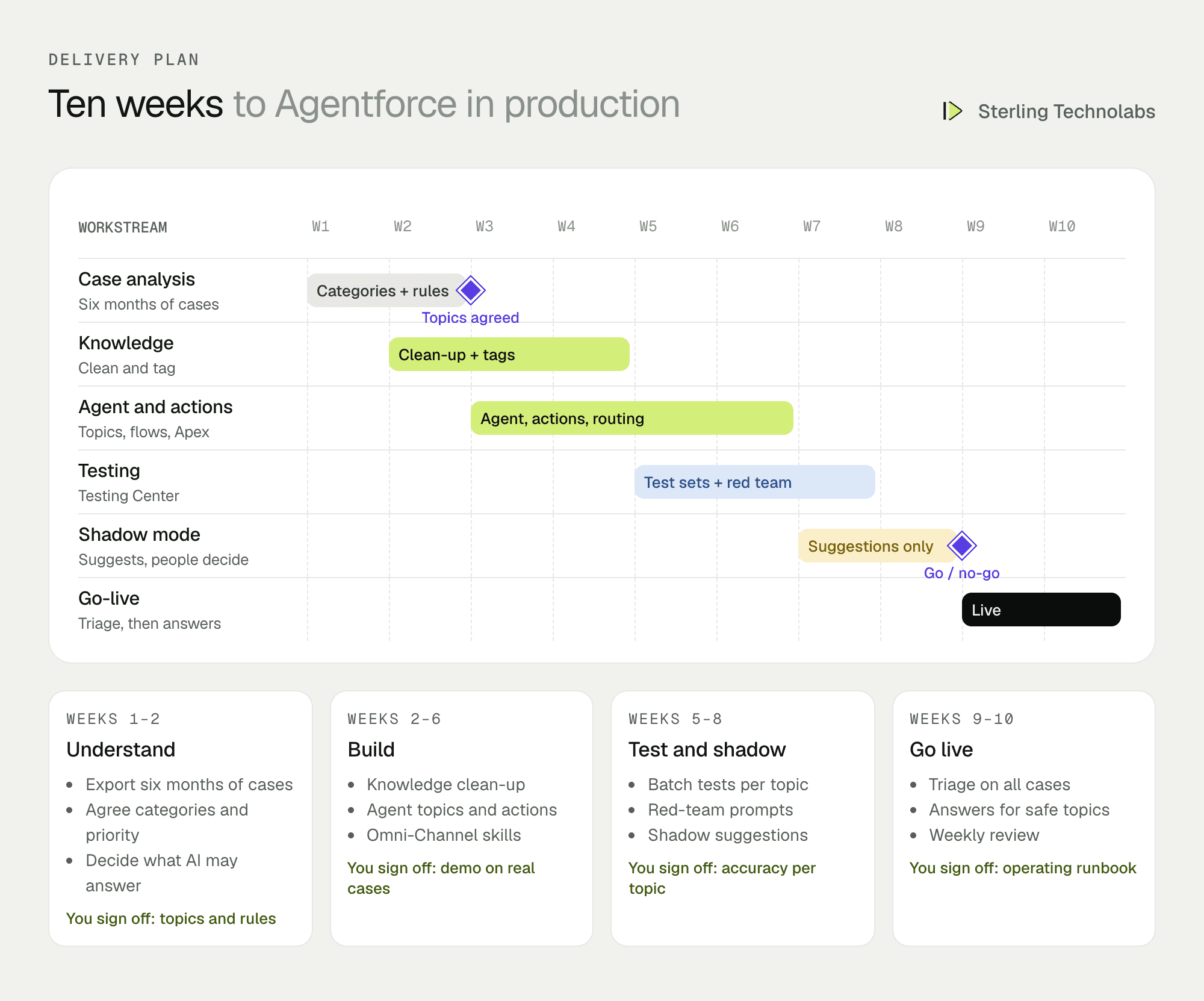
Triage goes live first on all cases, because it's low-risk and useful immediately. Answering goes live topic by topic, only where the test results and shadow-mode review meet the agreed bar.
The team
| Role | Time | What they own |
|---|---|---|
| Salesforce solution architect | Part time | Agent design, security, Data Cloud decisions |
| Agentforce developer | Full time | Topics, instructions, actions, Testing Center |
| Salesforce developer | Full time | Flows, Apex, Omni-Channel, console, Jira integration |
| Knowledge specialist | Weeks 2–5 | Article clean-up and tagging with your team |
From your side: the support manager, two senior engineers to review test results, and a Salesforce admin.
What changes the effort
- State of Knowledge. A tidy, current Knowledge base shortens the project. A messy one needs clean-up first.
- Number of topics. Triage plus one answering topic is a good start. Each extra topic needs its own tests.
- Data Cloud. Using product usage data adds setup but makes triage much better for technical products.
- Channels. Email and web are the baseline. Chat and messaging add a separate deployment.
- Licensing. Agentforce is priced per conversation or by credits; we'd estimate usage from your case volumes.
Risks and how we'd handle them
| Risk | What we'd do |
|---|---|
| Wrong answer to a customer | Answers only from safe-tagged articles, never on P1 or sensitive topics, and shadow mode before any topic goes live. |
| Misrouted urgent cases | Entitlement and keyword rules run alongside the agent for P1 detection, and P1s always notify the on-call lead. |
| Instructions drift as the product changes | Weekly review of overrides, and the test set rerun after every change. |
| Data exposure | Einstein Trust Layer masking, field-level security on actions, and no customer data in instructions. |
| Costs higher than expected | Usage estimated from case volumes up front, with monitoring and alerts on consumption. |
What we'd measure
| Metric | How we'd measure it | Baseline from |
|---|---|---|
| Triage accuracy | Agent's product area and priority versus engineer's final values | Test set from past cases |
| Time to first response | Case created to first reply, by priority | Last six months of cases |
| AI-resolved share | Cases closed after an AI answer with no reopen in 7 days | Not applicable today |
| SLA breaches | Cases missing their entitlement milestone | Current milestone reports |
| Engineer handle time | Time from accept to resolution on escalated cases | Current case history |
Build or buy?
If you already run Service Cloud, Agentforce is usually the natural choice, because the agent works on your case data and permissions directly. A separate AI support tool can make sense if your support runs outside Salesforce, or if you only need a website chatbot. The real work in either case is the same: clean Knowledge, clear rules about what the AI may do, actions that read real data, and testing before anything reaches a customer.
Questions we'd ask on the first call
- How many cases a week, and through which channels?
- How are cases categorised and prioritised today, and how consistent is it?
- How current is your Knowledge base, and who owns it?
- Which topics would you never want an AI to answer?
- Which Salesforce edition and add-ons do you have, including Data Cloud?
FAQ
Do we need Data Cloud?
Not for a first version. Triage and answers can work from Service Cloud and Knowledge alone. Data Cloud helps when product usage or connector status should influence triage.
Can the agent close cases?
We recommend it doesn't in phase one. It answers and waits for the customer to confirm; closing rules can be added once you trust the results.
How do you test an AI agent?
We build a test set from your past cases with known correct categories and answers, run it in Agentforce Testing Center before every change, and review shadow-mode suggestions with your engineers before going live.
:: Typical stack
Agentforce, Service Cloud, Data Cloud, Knowledge, Flow, Apex actions, Omni-Channel
:: Related service
Agentforce implementation
See the service

Send us your brief. We’ll help turn it into reality
A senior engineer replies within one business day with questions or a first plan: approach, team, timeline and estimate.
More blueprints like this


