Salesforce Financial Services Cloud for a wealth management firm
Growing advisory firms outgrow CRMs that only hold contacts and notes. This is how we'd implement Salesforce Financial Services Cloud so households, accounts, onboarding, reviews and compliance evidence sit in one place advisors actually use.
Industry
Wealth management
Typical timeline
16–18 weeks
Typical team
6 people

The situation
Picture an independent registered investment adviser (RIA) based in Chicago with $6 billion in client assets, 45 advisors across nine offices and about 7,000 client households. It has grown by bringing in advisor teams and buying smaller firms, and each one arrived with its own habits and tools.
The firm runs on a CRM built for small advisory practices. It holds contacts and notes, but not the full picture of a household: who is married to whom, which trusts and entities exist, which accounts sit at Schwab and which at Fidelity. Advisors check balances in the portfolio reporting system, plans in the planning software, and onboarding status in an operations spreadsheet. New client paperwork is chased by email. Annual review prep takes an associate half a day per household. Compliance asks for evidence of reviews and suitability, and getting it means searching several systems.
The firm wants Salesforce Financial Services Cloud as the system advisors, operations and compliance share, connected to its custodians, portfolio reporting and planning tools.
Signs this blueprint fits you
- Your CRM holds contacts and notes but not households, entities and accounts together.
- Advisors open several systems to prepare for one client meeting.
- Onboarding and paperwork are tracked in spreadsheets and email.
- You have grown by acquisition and teams work in different ways.
- Compliance evidence takes hours to pull together.
What we'd build
- Households and relationships in Financial Services Cloud: members, trusts, businesses, beneficiaries and outside professionals such as CPAs and attorneys, with a relationship map advisors can read at a glance.
- Financial accounts and holdings loaded every night from your portfolio reporting system, which already collects custodian data, so balances and positions are current each morning.
- Client onboarding with action plans: account paperwork, risk profile, investment policy statement, transfers and funding, each with an owner and due date.
- Service requests for money movement, address changes, beneficiary updates and required minimum distributions, routed to operations with status visible to the advisor.
- Review meetings scheduled by household tier, with a prep sheet built from balances, open items, life events and the last meeting's notes.
- A client portal on Experience Cloud for secure document exchange, forms and request status.
- Compliance reporting: reviews completed, suitability documents on file, and an audit trail of client communications.
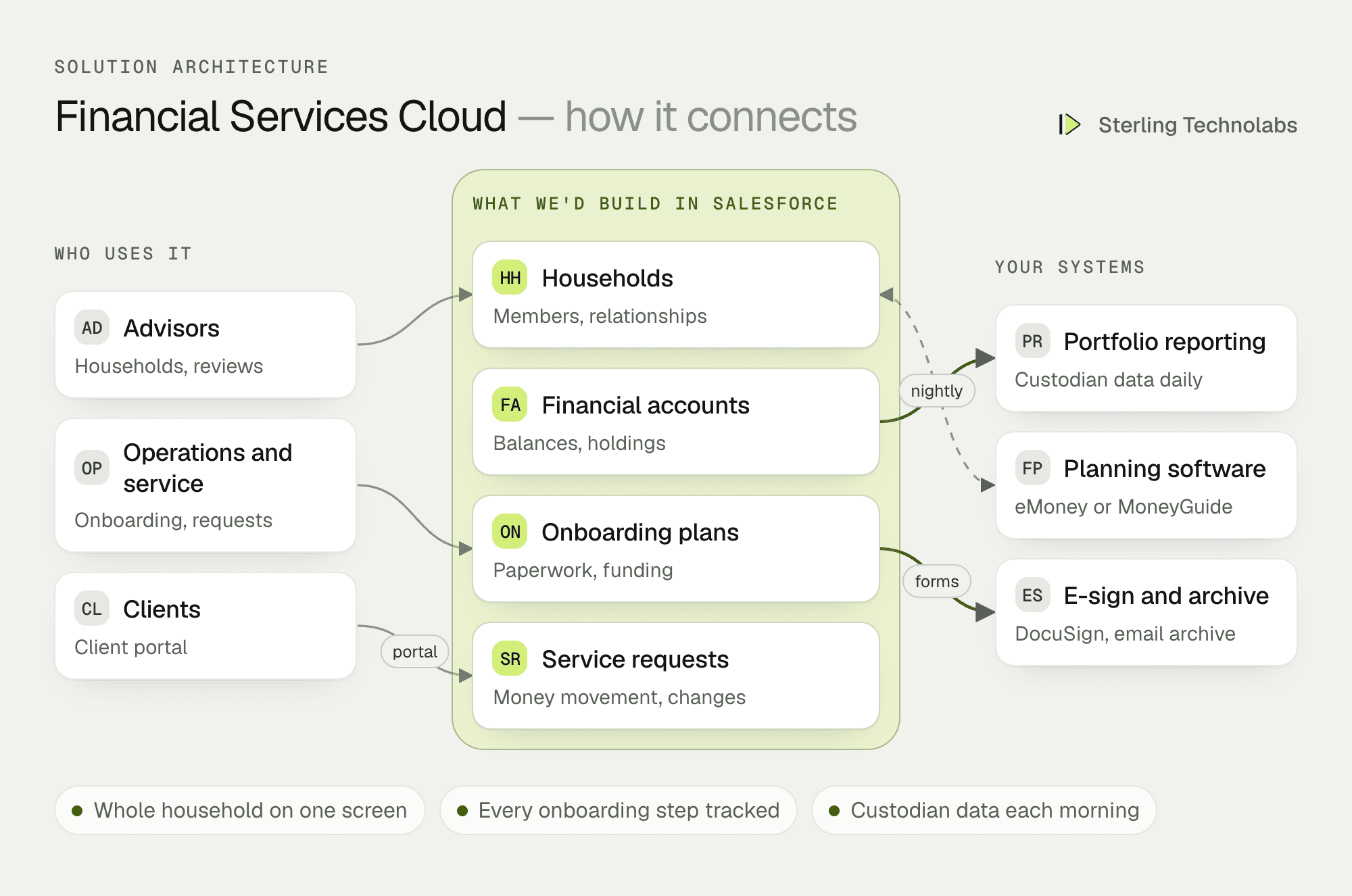
How the pieces fit
The household is the centre
Financial Services Cloud is built around the way advisors think: households, the people in them, and the accounts and entities they own. A trust can belong to one household and name members of another as beneficiaries. The CPA who refers clients appears on every household they're connected to. Advisors see assets, relationships, open items and the next meeting on one screen.
Custodian data without re-keying
Your portfolio reporting system, such as Orion, Black Diamond or Addepar, already collects positions and transactions from custodians each day. We'd bring account balances and holdings into Salesforce from there every night rather than connecting to each custodian separately. Accounting and performance reporting stay where they are.
Onboarding as a plan, not a checklist
When a new household signs, an action plan starts: the right account forms for each account type, a risk questionnaire, the investment policy statement, and transfers from other firms. Forms go out for e-signature with client data already filled in. Operations sees every open step across all new clients, and advisors see where their own clients stand.
Compliance built into daily work
Review meetings, notes, documents and requests are recorded as part of the work, so compliance reports come from the same data. Client emails stay in your archiving system, with links to the household in Salesforce. Field-level security keeps sensitive data, such as account numbers and tax IDs, visible only to the people who need it.
One new household, end to end
Here is a couple referred by their CPA after selling a business.
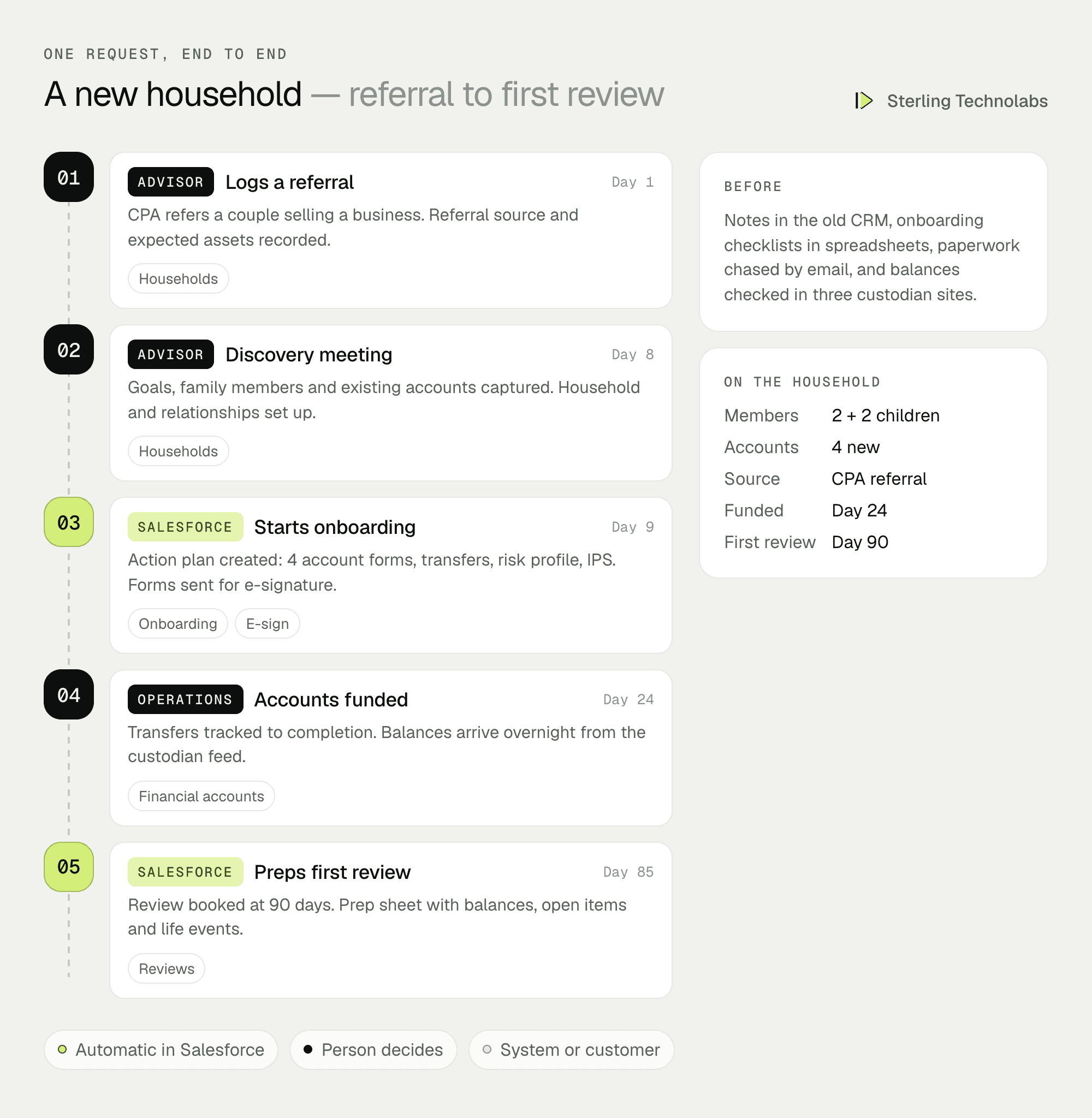
Operations knew what was outstanding at every step, the couple signed everything online, and the first review was prepared from data already in Salesforce.
What advisors would see
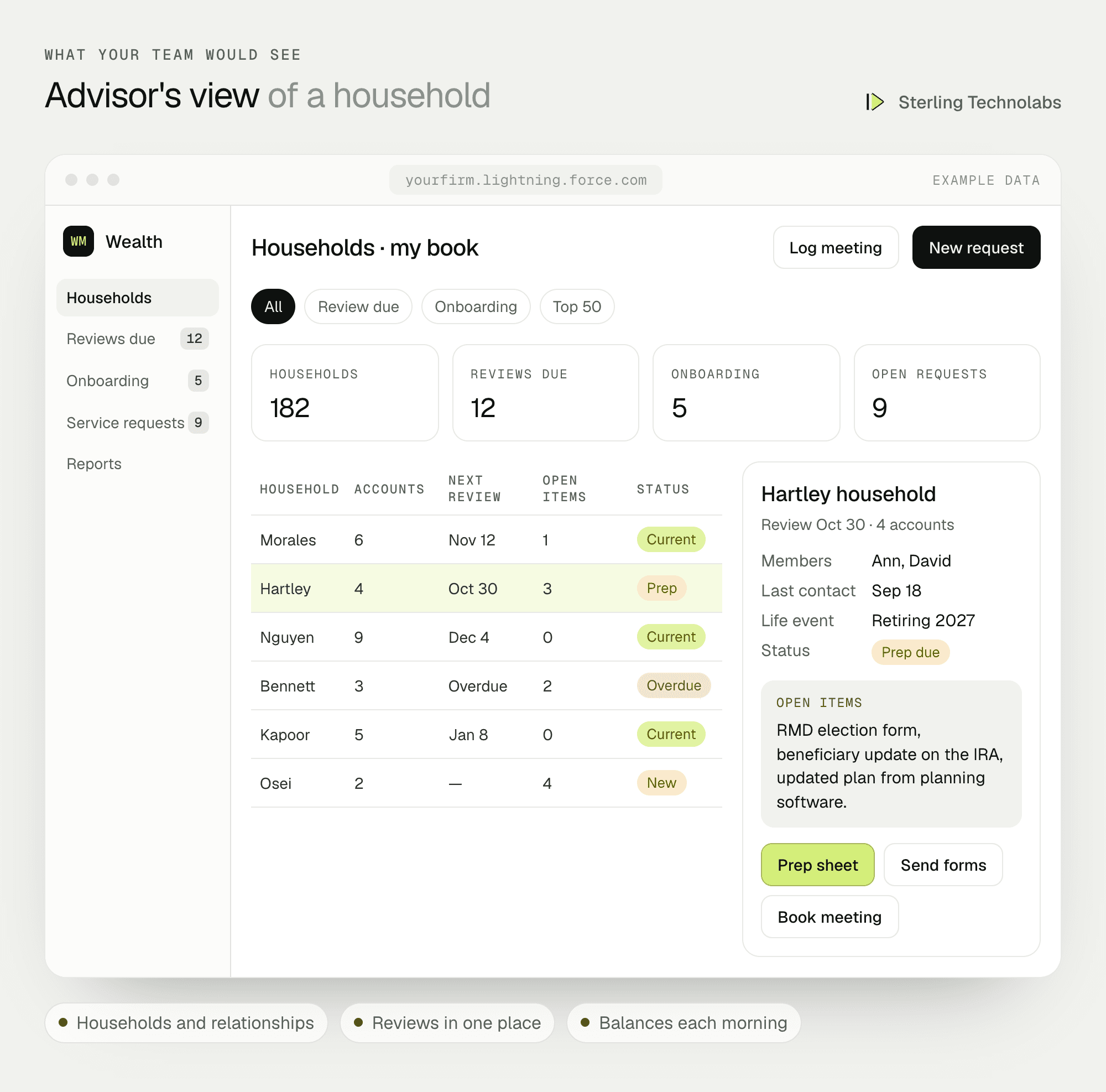
Advisors see their book of households with reviews due, onboarding in progress and open service requests. Opening a household shows members, accounts, life events and open items.
Salesforce for wealth management: features by team
| Advisors | Operations and service | Compliance and clients |
|---|---|---|
| Households, relationships and assets | Onboarding action plans | Review and suitability reports |
| Review prep sheets | Service requests and money movement | Audit trail of activity |
| Referral sources and pipeline | E-signed account paperwork | Client portal for documents |
| Life events and next steps | Work queues by team | Request status for clients |
Data and integrations
| Data | System of record | Direction | When |
|---|---|---|---|
| Households, relationships, activities | Salesforce Financial Services Cloud | Salesforce only | Not applicable |
| Accounts, balances, holdings | Portfolio reporting (custodian data) | To Salesforce | Nightly |
| Financial plans and goals | Planning software | Both ways, where supported | Daily |
| Account forms and signatures | DocuSign or similar | Both ways | As forms are sent and signed |
| Client emails | Email archiving system | Linked to Salesforce | As emails are sent |
| Legacy notes and contacts | Old CRM | To Salesforce | Once, at go-live |
Delivery plan
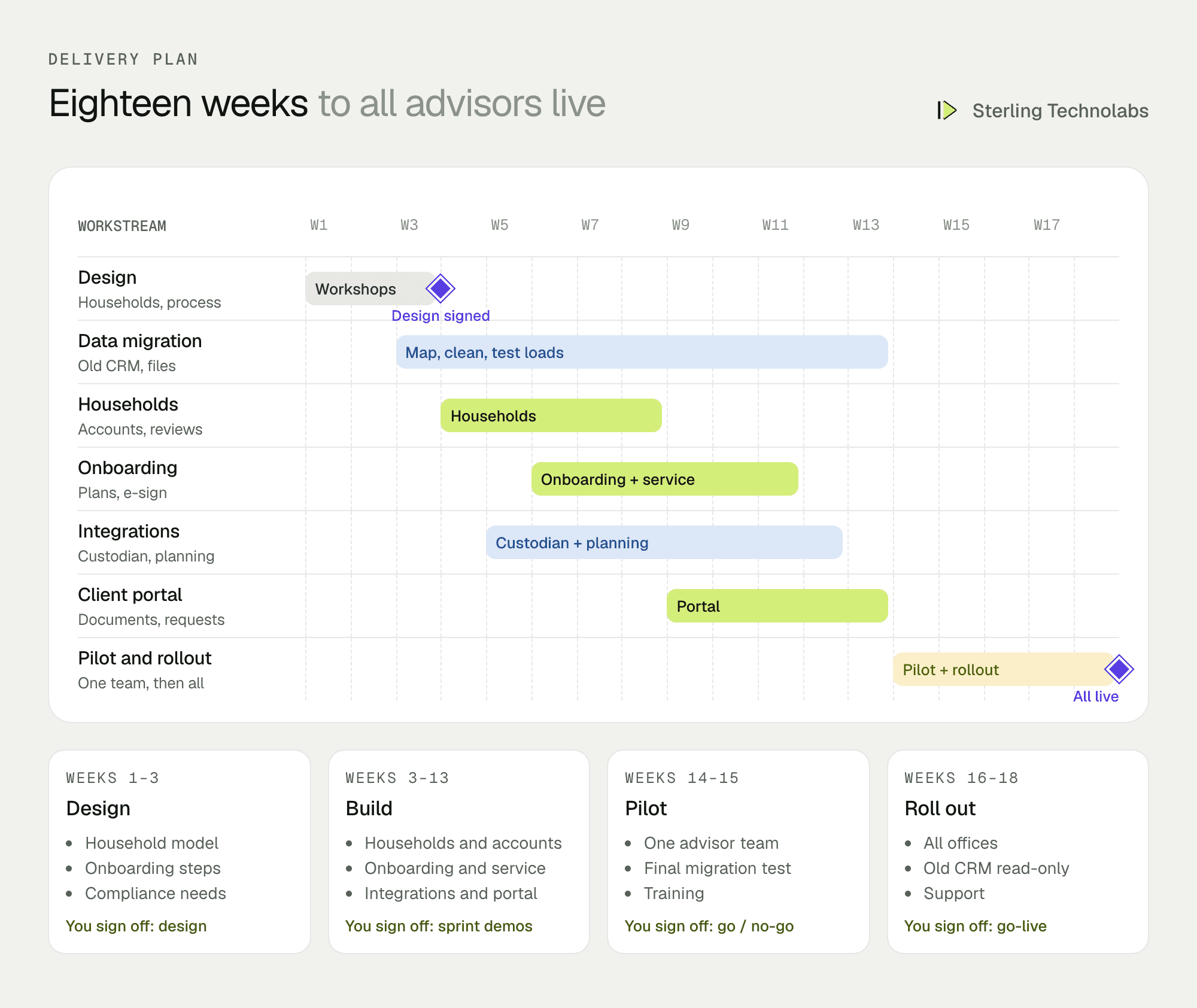
We'd pilot with one advisor team and its operations staff for two weeks, then roll out to all offices together so the firm isn't running two CRMs for long. The old CRM stays read-only as an archive for your retention period.
The team
| Role | Time | What they own |
|---|---|---|
| Salesforce solution architect | Part time | Financial Services Cloud design, security, integrations |
| Business analyst with wealth management experience | Full time | Advisor, operations and compliance processes, UAT |
| Salesforce developers (2) | Full time | Configuration, action plans, flows, client portal |
| Integration developer | Weeks 5–13 | Portfolio reporting, planning and e-sign integrations |
| QA and data migration specialist | Weeks 3–18 | Migration, reconciliation, testing |
From your side: two advisors, your head of operations, your chief compliance officer, and your current CRM administrator.
What changes the effort
- Household complexity. Trusts, entities and multi-generation families take more design than simple households.
- Integrations. Portfolio reporting systems with standard connectors are quicker than custom feeds.
- Acquired firms. Each firm's data and habits need mapping before migration.
- Client portal. Document exchange is standard; account aggregation and planning views add work.
- Licences. Advisors, operations and client portal users need different licence types.
Risks and how we'd handle them
| Risk | What we'd do |
|---|---|
| Advisors don't adopt it | Advisors design the household screen with us, and review prep saves them time from day one. |
| Balances don't match custodians | Nightly reconciliation against portfolio reporting, with exceptions flagged to operations. |
| Sensitive data exposure | Field-level security, Shield encryption where needed, and access reviewed by compliance. |
| Books and records requirements | Retention rules agreed with compliance, and emails kept in your archiving system. |
| Messy legacy data | Duplicates merged and households rebuilt before load, with advisors checking their own book. |
What we'd measure
| Metric | How we'd measure it | Baseline from |
|---|---|---|
| Onboarding time | Days from signed agreement to funded accounts | Operations spreadsheet |
| Review prep time | Associate hours per review | Time sampling |
| Reviews completed on time | Households reviewed within their cycle | Current CRM |
| Service request time | Days from request to completion | Email and spreadsheets |
| Compliance report time | Hours to produce exam evidence | Compliance team |
Build or buy?
CRMs built for advisors, such as Wealthbox or Redtail, suit many small and mid-sized practices and cost less to run. Salesforce Financial Services Cloud makes sense for firms with many advisors and offices, complex households, growth through acquisition, a need to connect several systems, or plans to add a client portal and deeper reporting. We'll tell you on the first call which fits your firm.
Questions we'd ask on the first call
- How many advisors, offices and households do you have?
- Which custodians, portfolio reporting and planning tools do you use?
- How does onboarding work today, and where does it slow down?
- What does compliance ask for during exams?
- Do you plan more acquisitions or advisor teams joining?
FAQ
What is Salesforce Financial Services Cloud?
It is Salesforce's product for banks, insurers and wealth managers, with a data model for households, financial accounts and relationships, plus tools for onboarding, service and compliance.
Is Salesforce good for wealth management firms?
Yes, for firms with many advisors, complex households or several systems to connect. Small practices often do well with advisor-specific CRMs.
Can Financial Services Cloud show custodian data?
Yes. Balances and holdings are usually loaded nightly from your portfolio reporting system, which already collects custodian data.
How long does a Financial Services Cloud implementation take?
For a firm of this size, with migration, onboarding, integrations and a client portal, typically 16 to 18 weeks.
:: Typical stack
Salesforce Financial Services Cloud, Experience Cloud, Flow, portfolio reporting integration (Orion, Black Diamond or Addepar), planning software, DocuSign
:: Related service
Salesforce implementation
See the service

Send us your brief. We’ll help turn it into reality
A senior engineer replies within one business day with questions or a first plan: approach, team, timeline and estimate.
More blueprints like this


