Insurance claims processing automation for a regional P&C insurer
Most claims teams still re-key FNOL, chase photos by email and work simple and complex claims in one queue. This is how we'd automate claims processing around the core system, so simple claims move in hours and adjusters spend their time on judgement.
Industry
Property and casualty insurance
Typical timeline
14–16 weeks
Typical team
5 people

The situation
Picture a regional property and casualty insurer writing personal auto and homeowners policies in five Midwest states. It handles about 30,000 claims a year with a team of 60 adjusters, on a core claims system that works well for adjusting but poorly for everything around it.
First notice of loss comes in by phone, email, agent portals and a basic web form. Call-center staff type the details into the claims system, then adjusters chase photos, police reports and repair estimates by email. A cracked windshield and a total-loss collision start in the same queue. Simple claims wait days for assignment, adjusters spend much of their time on paperwork, and policyholders call back to ask what's happening. Leadership also worries about missing state deadlines for acknowledging and deciding claims.
The insurer doesn't want to replace its claims system. It wants claims processing automation around it: a better way in for policyholders, documents read automatically, simple claims fast-tracked, and adjusters focused on the claims that need judgement.
Signs this blueprint fits you
- FNOL arrives through several channels and is re-keyed into the claims system.
- Adjusters chase photos, reports and estimates by email.
- Simple and complex claims wait in the same queue.
- You track regulatory deadlines in spreadsheets or not at all.
- Your core system is staying, but you need a better claims experience around it.
What we'd build
- Digital FNOL on web and mobile, plus a guided version for agents and call-center staff, that collects the right details for each line of business and policy.
- Photo and document intake by upload or text link, with documents such as police reports, estimates and invoices read and their key fields extracted.
- Triage and routing: each claim scored for complexity and severity using rules you set, then routed to fast-track, a desk adjuster or a field adjuster.
- Fraud indicators checked on every claim, with anything suspicious referred to your special investigations unit, never denied automatically.
- An adjuster workspace showing the claim, policy, documents, extracted values, reserves and tasks in one place.
- Policyholder updates by text and email at every step, and a status page they can check any time.
- Deadline tracking for acknowledgement, investigation and decision timelines by state, with alerts before anything is missed.

How the pieces fit
The core claims system stays the record
Claims, coverage, reserves and payments stay in your core system, whether that's Guidewire ClaimCenter, Duck Creek or an in-house platform. The automation layer creates the claim there through its API, adds documents and notes, and reads status back. Adjusters can work in either place, and nothing about financial controls or reporting changes.
Reading documents and photos
A document extraction model reads police reports, repair estimates, medical bills and invoices into structured fields with confidence scores. Photos are checked for quality and labelled by what they show. Low-confidence values go to a person to confirm. Nothing extracted is treated as a decision.
Triage you can explain
Triage uses rules your claims leaders agree, such as line of business, damage type, estimate amount, injuries reported, policy age and prior claims. Every routing decision shows the rules that triggered it, so it can be audited and tuned. Fast-track handles low-value, clear-coverage claims like auto glass or minor property damage, with an adjuster approving the payment.
People decide coverage and payment
Automated insurance claims processing here means collecting, reading, routing and reminding. Coverage decisions, payments, denials and fraud findings stay with licensed adjusters and your SIU.
One claim, end to end
Here is a windshield claim from a policyholder's phone to payment approval.
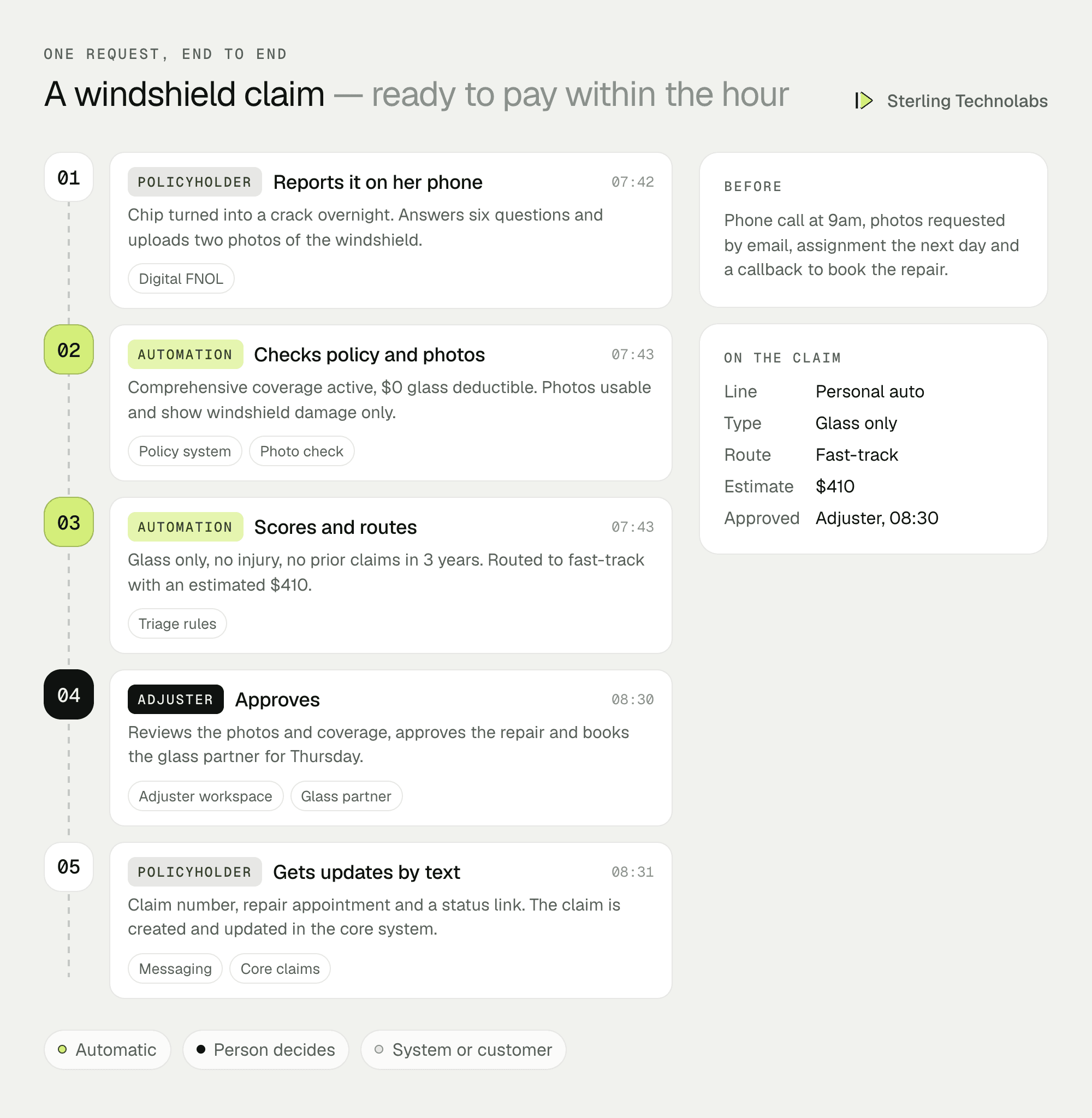
A claim that used to wait for a phone call, an email for photos and a manual assignment was ready for an adjuster's approval within the hour.
What adjusters would see

Adjusters see their claims ranked by deadline and urgency, with documents already read and the reason each claim landed with them. Fast-track claims need one review and an approval.
Insurance claims processing workflow
| Step | Before | With automation |
|---|---|---|
| First notice of loss | Phone call, typed by staff | Guided digital FNOL, created in the core system |
| Documents and photos | Requested and chased by email | Text link, read and filed automatically |
| Assignment | Manual, by supervisor | Triage rules route to the right queue |
| Simple claims | Same queue as complex ones | Fast-track with adjuster approval |
| Status updates | Policyholder calls in | Text and email at every step |
| Deadlines | Spreadsheet or memory | Tracked per state with alerts |
Data and integrations
| Integration | What it's for | Example options |
|---|---|---|
| Core claims system | Create claims, add documents, read status | Guidewire, Duck Creek, in-house API |
| Policy system | Coverage and policy details at FNOL | Policy admin API |
| Documents | Storage and extraction | Your document store, extraction service |
| Messaging | Text and email updates | Twilio, SendGrid or your provider |
| Third parties | Glass, repair and rental networks | Partner APIs |
| Fraud data | Prior claims and indicators | Industry databases you already use |
Delivery plan
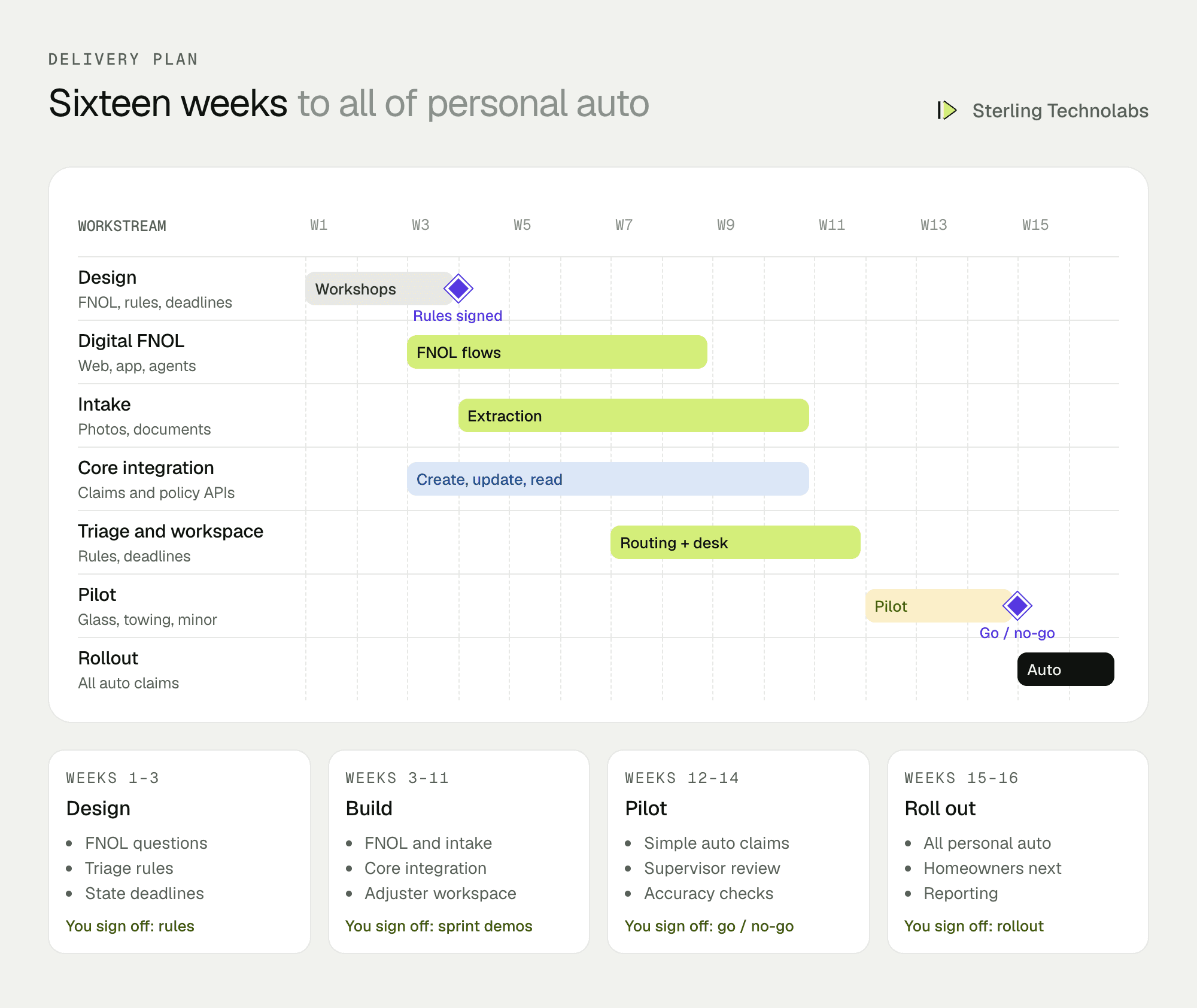
We'd start with one line of business, personal auto, and the claim types where fast-track makes the biggest difference: glass, towing and minor damage. Homeowners follows once triage rules have been tuned on real claims. The first weeks run with every routing decision reviewed by a supervisor.
The team
| Role | Time | What they own |
|---|---|---|
| Solution architect | Part time | Integration with core systems, security |
| Business analyst with claims experience | Full time | FNOL questions, triage rules, deadlines by state |
| Back-end developers (2) | Full time | Intake, extraction pipeline, routing, integrations |
| Front-end developer | Full time | FNOL flows, adjuster workspace, status page |
| QA engineer | From week 5 | Extraction accuracy, routing tests, UAT |
From your side: a claims operations lead, two experienced adjusters, someone from compliance, and access to your core system's API team.
What changes the effort
- Core system API. A modern claims API is quicker to work with than batch files or screen-level integration.
- Lines of business. Each line adds FNOL questions, documents and triage rules.
- Document types. Estimates and police reports vary by state and vendor; medical bills add complexity.
- Payments. Stopping at approval is simpler than paying out through new channels.
- Partner networks. Glass, repair and rental integrations are each their own piece of work.
Risks and how we'd handle them
| Risk | What we'd do |
|---|---|
| Wrong routing | Rules reviewed by claims leaders, supervisor review in the first weeks, and every routing decision explained. |
| Unfair outcomes | No automatic denials. Coverage and payment decisions stay with licensed adjusters, and rules are reviewed for consistency. |
| Extraction errors | Confidence scores, people confirm low-confidence values, accuracy tracked by document type. |
| Missed deadlines | State timelines configured with compliance, alerts before each deadline, and a daily report. |
| Data protection | Encryption, access by role, audit logs, and only the data each step needs. |
What we'd measure
| Metric | How we'd measure it | Baseline from |
|---|---|---|
| FNOL to assignment | Hours from first notice to an adjuster owning the claim | Core system timestamps |
| Fast-track cycle time | FNOL to payment for fast-track claims | Same claim types today |
| Digital FNOL share | Claims reported without a phone call | Channel reports |
| Status calls | Inbound calls asking for claim status | Call-center data |
| Deadline compliance | Acknowledgements and decisions within state timelines | Compliance audits |
Build or buy?
Claims platforms increasingly include digital FNOL and document features, and if yours does, using it is often the best first step. A custom layer makes sense when your core system's digital tools are limited or expensive to extend, when you want one experience across several lines and systems, or when triage and fast-track rules are something you want to control and change quickly yourselves.
Questions we'd ask on the first call
- Which lines of business and claim volumes are we talking about?
- Which core claims and policy systems do you use, and what APIs do they offer?
- How is FNOL taken today, and through which channels?
- Which claim types would you most like to fast-track?
- How do you track state deadlines now?
FAQ
What is claims processing automation?
It is software that takes over the repetitive steps of a claim, such as intake, document reading, routing, reminders and status updates, so adjusters can focus on coverage, damages and people.
Does automated claims processing make decisions on claims?
Not in this design. It recommends routing and fast-track eligibility. Coverage decisions, payments and denials stay with licensed adjusters.
Can it work with Guidewire or Duck Creek?
Yes. The automation layer integrates with core claims systems through their APIs and keeps them as the system of record.
What is digital FNOL?
First notice of loss reported online or in an app, with guided questions and photo upload, instead of by phone. It's usually the quickest improvement for both policyholders and claims teams.
:: Typical stack
Digital FNOL (web and mobile), document extraction model, rules engine, Guidewire or Duck Creek APIs, Python, React, AWS
:: Related service
AI software development
See the service

Send us your brief. We’ll help turn it into reality
A senior engineer replies within one business day with questions or a first plan: approach, team, timeline and estimate.
More blueprints like this


