Custom CRM for a residential solar installer
Solar installers lose track of projects once the contract is signed. This is how we'd build a custom CRM that runs from first lead to permission to operate, with permits, utility steps, crew photos and customer updates on one record.
Industry
Solar and home energy
Typical timeline
12–14 weeks
Typical team
5 people

The situation
Picture a residential solar installer in Arizona with 120 employees, offices in Phoenix and Tucson, and about 1,800 installs a year. Sales reps sell in the home, project coordinators chase permits and utility approvals, and crews do site surveys and installs. Battery storage and panel upgrades are a growing share of each job.
The company uses a general sales CRM for leads, and it works until the contract is signed. After that, the project lives in spreadsheets: permit status, utility interconnection, install dates, inspection results and the final step, permission to operate (PTO) from the utility. Survey photos arrive by text message. Financing status sits in each lender's portal. When a homeowner calls to ask where their project is, the coordinator opens four tools to find out, and blocked projects are found weeks late.
The company tried two off-the-shelf solar CRMs. Both covered the sales side well but didn't match how its projects run, its lender mix or its commission rules. It wants custom CRM development: one system from first lead to PTO, built around its own process.
Signs this blueprint fits you
- Your CRM stops at the signed contract and projects run in spreadsheets.
- Customers call to ask where their project is, and the answer takes time to find.
- Permit and utility delays are found late.
- Crews send photos and notes by text or email.
- Off-the-shelf CRMs don't fit your stages, lenders or commission rules.
What we'd build
- Leads and appointments: leads from the website, ads, referrals and lead vendors in one queue, routed to reps by territory and availability, with appointment booking and reminders.
- Proposals and contracts: system designs pulled from your solar design tool, pricing with adders such as panel upgrades and batteries, financing options from your lenders, and e-signed contracts.
- Project tracking from contract to PTO: site survey, engineering, permit, utility interconnection, install, inspection and PTO, each with owners, due dates and blockers.
- A field app for surveyors and install crews: job details, checklists, required photos, and notes that go straight to the project.
- Customer updates by text and email at each milestone, so homeowners know what is happening without calling.
- Commissions and reporting: rep commissions by your rules, cycle times by stage and region, and cash collected by milestone.
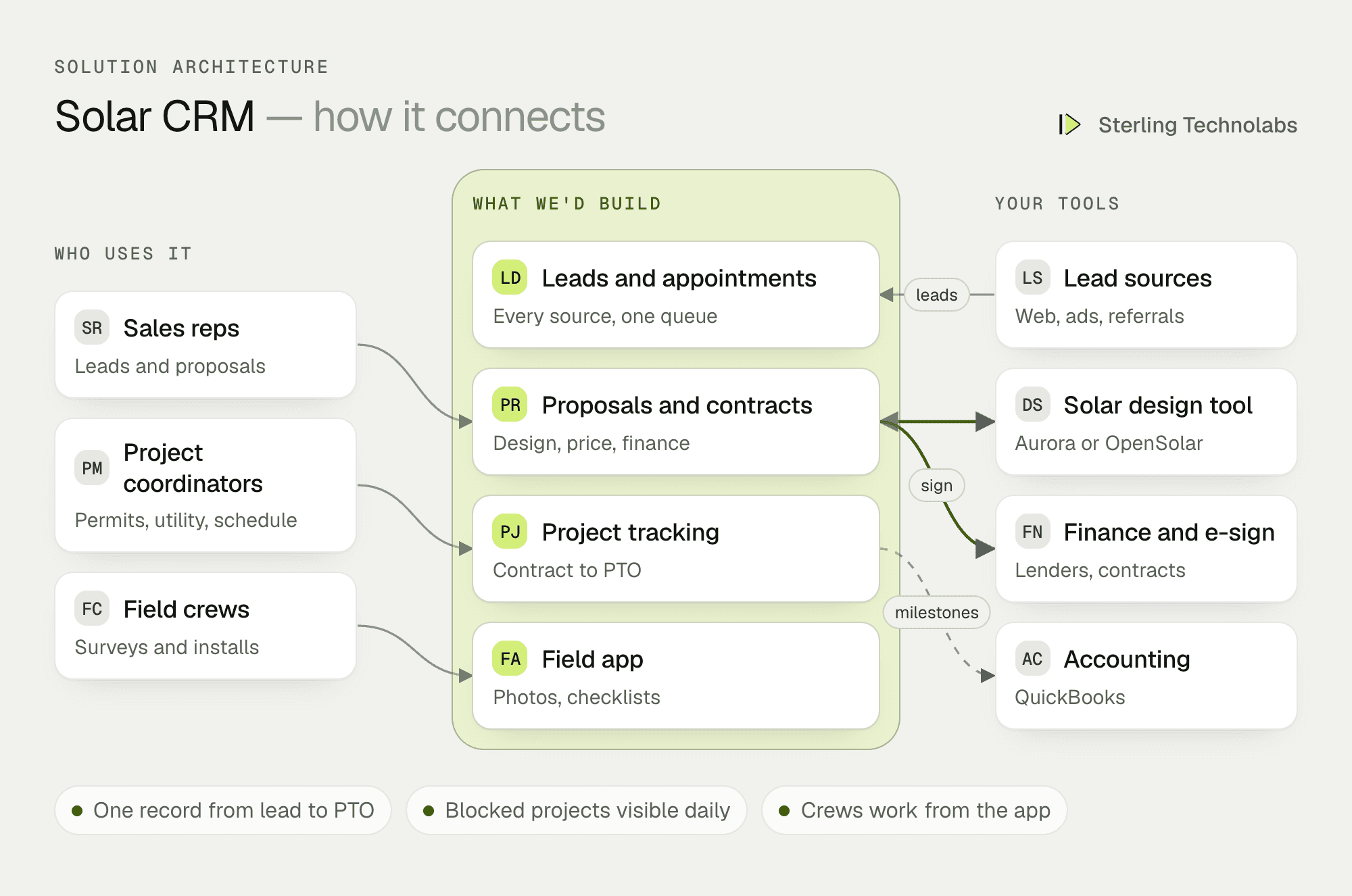
How the pieces fit
One record from lead to PTO
The homeowner, the home, the system design, the contract, the financing and every project step sit on one record. Sales sees what happens after the sale, and coordinators see what was promised in the home. When a rep sells a battery, the project gets the extra permit and utility steps automatically.
Stages that match how solar projects run
Each stage has its own checklist and the documents it needs: a survey can't close without roof and panel photos, and a permit can't be submitted without the engineering stamp. Every project shows how many days it has been in its current stage, and anything stuck longer than your normal time for that city or utility is flagged.
Connected to the tools you keep
Your solar design tool, such as Aurora or OpenSolar, stays where designers work; the CRM pulls the design and production estimate into the proposal. Lenders' portals stay the place for credit decisions; the CRM tracks application status and milestone payments. QuickBooks stays the books; invoices go across at each payment milestone.
A field app crews will use
Crews see their jobs for the day, the address, the design and the customer's notes. Required photos are listed by step, and the app won't let a survey close until they are taken. It works offline on roofs and in attics, and uploads when the phone has signal.
One homeowner, end to end
Here is a homeowner in Mesa, from website form to permission to operate.
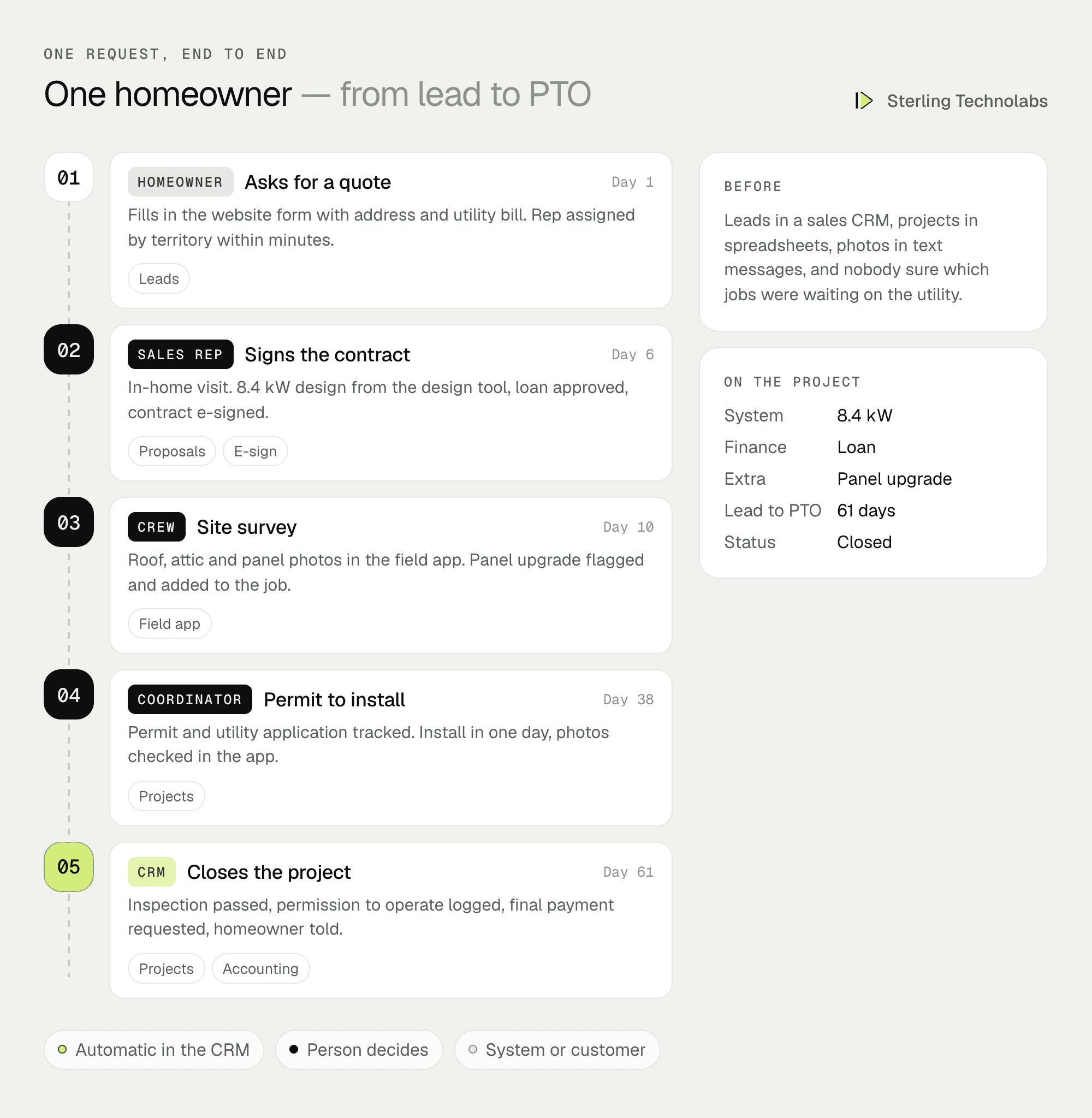
Every step is visible on one record, and the homeowner got a text at each milestone, so coordinators work on blockers instead of answering status calls.
What project coordinators would see
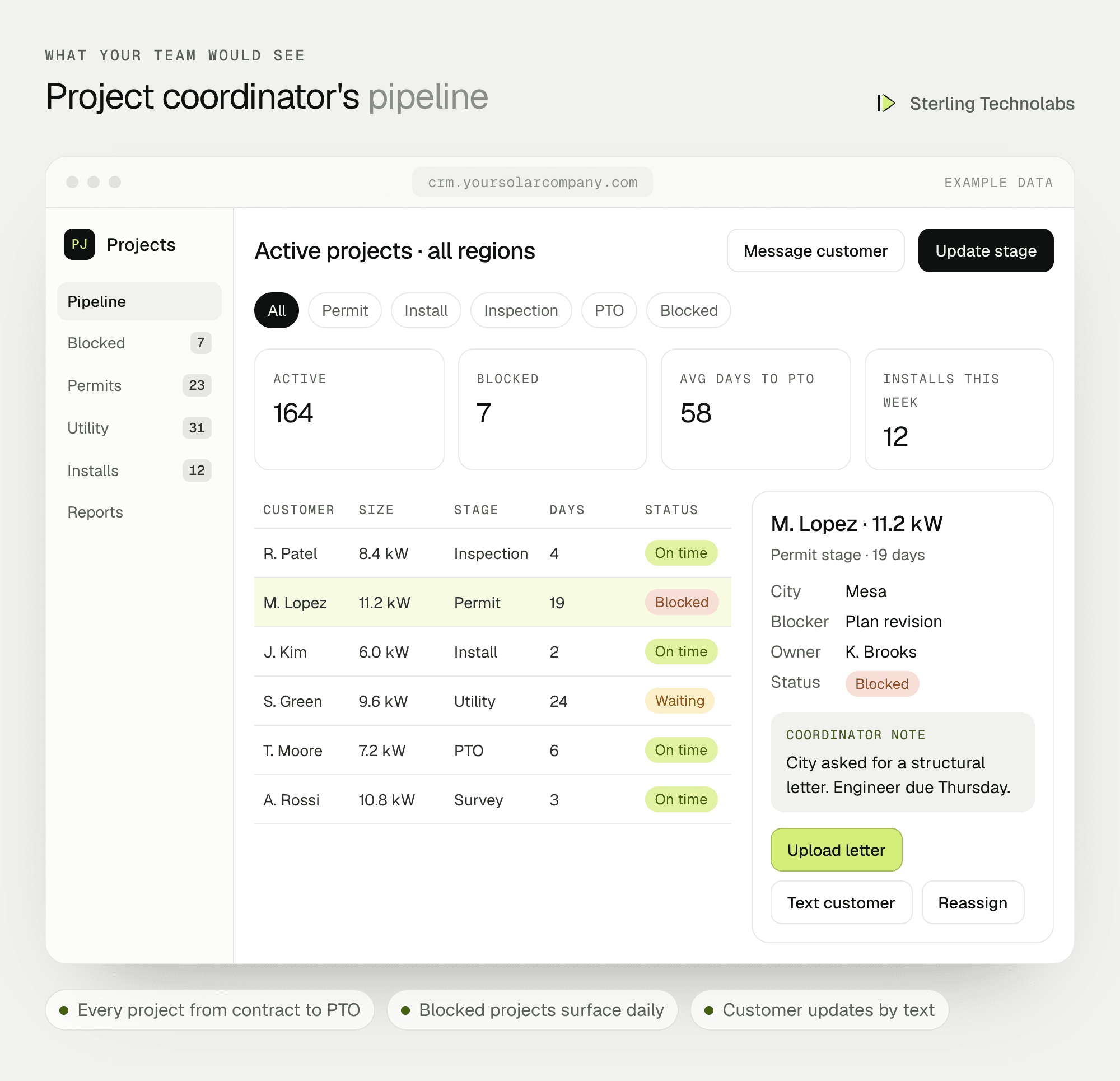
Coordinators see every active project by stage, with days in stage and blocked projects at the top. Sales managers see the lead and proposal pipeline; owners see cycle times and cash by milestone.
Solar CRM features by team
| Sales | Projects and operations | Field crews and customers |
|---|---|---|
| Lead routing by territory | Stages from contract to PTO | Daily jobs on a phone |
| Proposals with design and financing | Permit and utility tracking | Required photos by step |
| E-signed contracts | Blocked projects flagged | Offline use on site |
| Commission statements | Cycle time reports | Milestone updates by text |
Data and integrations
| Integration | What it's for | Example options |
|---|---|---|
| Lead sources | Web forms, ads, lead vendors | Website, Google and Meta lead forms |
| Solar design | System design and production | Aurora Solar, OpenSolar |
| Financing | Loan and lease status, milestone payments | Your lenders' APIs or portals |
| E-signature | Contracts and change orders | DocuSign or similar |
| Accounting | Invoices and payments by milestone | QuickBooks |
| Messaging | Customer updates | Twilio, email service |
Delivery plan

We'd go live with every open project moved across, so coordinators work in one place from day one. A customer portal, battery service tickets and other additions follow once the team has used the CRM for a few weeks.
The team
| Role | Time | What they own |
|---|---|---|
| Solution architect | Part time | Architecture, data model, integrations |
| Product designer | Weeks 1–7 | CRM screens and field app |
| Full-stack developers (2) | Full time | CRM, project tracking, integrations |
| QA engineer | From week 5 | Test plans, migration checks, UAT |
From your side: a sales manager, a lead project coordinator, a crew lead, and someone from finance for commissions and milestones.
What changes the effort
- Lenders. Each financing partner with an API is quicker than one that only offers a portal.
- Commission rules. Simple percentages are quick; splits, clawbacks and adders take longer.
- Utilities and cities. More jurisdictions mean more stage rules and documents.
- Data migration. Clean spreadsheets move quickly; years of mixed data need cleaning.
- Customer portal. Text and email updates come first; a full portal is a later phase.
Risks and how we'd handle them
| Risk | What we'd do |
|---|---|
| Open projects lost in the move | Every open project migrated and checked against the spreadsheets before go-live. |
| Reps go back to the old CRM | Old CRM closed at go-live, with lead routing only in the new one. |
| Crews skip photos | Required photos block a step from closing, and the app works offline. |
| Commission disputes | Rules agreed in writing and statements tested against past payouts. |
| Customer data exposure | Access by role, encrypted documents and audit history. |
What we'd measure
| Metric | How we'd measure it | Baseline from |
|---|---|---|
| Contract to PTO | Days from signed contract to permission to operate | Project spreadsheets |
| Days in each stage | Average days by stage and region | Project spreadsheets |
| Lead response time | Minutes from lead to first contact | Current CRM |
| Cancellations | Signed contracts cancelled before install | Sales records |
| Status calls | Inbound calls asking for project status | Phone system |
Build or buy?
Solar CRMs and project tools exist, and for many installers they are the right choice: they are quicker to start and cost less up front. Custom CRM development makes sense when your process, lender mix, commission rules or growth plans don't fit those products, or when per-user fees grow with your team. Some installers start with a product and move to a custom CRM once they know exactly what they need.
Questions we'd ask on the first call
- How many installs a year, and in how many regions?
- Where does your current CRM stop, and what runs in spreadsheets?
- Which design tool, lenders and accounting system do you use?
- Which stages cause the longest delays?
- How are commissions calculated today?
FAQ
What is custom CRM development?
Building a CRM around your own sales and delivery process instead of adapting your process to a product. You own the software and choose what it connects to.
Is a custom solar CRM better than an off-the-shelf one?
Not always. Off-the-shelf solar CRMs suit many installers. Custom is better when your stages, lenders, commissions or scale don't fit them.
How much does custom CRM software development cost?
It depends mostly on integrations, commission rules and the field app. We give a written estimate after the first call, with a smaller first release as an option.
How long does it take to build a custom CRM?
A first release covering leads, proposals, project tracking and a field app typically takes 12 to 14 weeks.
:: Typical stack
React, Node.js, PostgreSQL, field app (Flutter), Aurora Solar or OpenSolar API, lender APIs, DocuSign, QuickBooks, Twilio
:: Related service
Custom software development
See the service

Send us your brief. We’ll help turn it into reality
A senior engineer replies within one business day with questions or a first plan: approach, team, timeline and estimate.
More blueprints like this


