
Agentforce doesn’t charge you for talking. Under Salesforce’s Flex Credits model you pay for the actions an agent takes, such as updating a record or resolving a case, so two agents answering the same questions can cost very different amounts depending on how they are designed.
So what is Agentforce? It is Salesforce’s platform for AI agents that work on your CRM data and complete tasks within rules you set. This guide covers how it works, how it differs from Einstein, use cases by cloud, pricing and a five-step implementation plan.
What Is Agentforce and How Does It Work in Salesforce?

For your business, Agentforce acts as a software agent that completes tasks inside Salesforce, not just one that answers questions. It can look up a record, update a field, create a case, or send a reply based on what the user asks. So if you are asking what is Agentforce, it is an AI agent that reads your CRM data and then takes the next step for you.
The four parts of an agent
Every agent is built from four parts:
Reasoning engine: reads the request, works out what the user wants, and plans the steps.
Topics: the jobs the agent handles, such as order status or lead follow-up, with instructions for each.
Actions: the steps the agent can take, such as running a flow, calling Apex, or using a prompt template.
Trust layer and guardrails: mask sensitive data, filter unsafe output, and limit what the agent can do.
How a request flows
The user sends a request.
The reasoning engine matches it to a topic.
The agent picks actions and pulls the data it needs.
Guardrails check the response and the action.
The agent replies, or hands the case to a person.
Where it runs
Agentforce works across clouds such as Sales and Service, and it uses Data Cloud to ground answers in your customer data. Keep in mind that the agent is only as accurate as the data behind it, so that is where you should start.
Agent type | Who uses it | Example jobs |
|---|---|---|
Employee-facing | Your sales, service, and ops teams | Summarize an account, draft a follow-up, update records |
Customer-facing | Your customers on web, chat, or messaging | Answer product questions, check order status, create a case |
Salesforce Einstein vs Agentforce: What Changed
To better understand Salesforce Einstein vs Agentforce, start with the rename. Einstein Copilot, the earlier assistant, is now called Agentforce Assistant. So the two are not competing products. The assistant is one part of the larger Agentforce platform.
What is actually new
Planning: Einstein Copilot mostly picked a response or an action for each request. Agentforce plans a task from start to finish.
Multiple steps: An agent can run several actions in a row, check the result, and decide what to do next.
Less hand-holding: Copilot worked with a person at every step. An agent can work alone inside the rules you set, and it hands off to a person when needed.
Side-by-side comparison
Area | Einstein Copilot / Agentforce Assistant | Agentforce agents |
|---|---|---|
Autonomy | Works with a user, who reviews each step | Works on its own within set rules |
Reasoning | Picks a reply or action per request | Plans and repeats a reason, act, and check loop |
Actions | Usually one action per request | Several actions per task |
Typical use | Summarize a deal, draft an email, find records | Resolve a case, qualify a lead, update records |
What “Einstein” means now
Einstein is still a Salesforce AI brand. You will see it in predictive features such as lead scoring and forecasting, and in the Einstein Trust Layer, which protects your data when agents use language models. Keep in mind that Salesforce updates product names often, so it is best to check the current docs before you plan a rollout.
Agentforce Use Cases by Cloud
Here are some of the most common Agentforce use cases, grouped by cloud. For each one, you will see what the agent does, the data it needs, and a small first project you can start with.
Sales
The agent handles lead follow-up and deal updates. It can score a lead, draft an email, book a meeting, and update an opportunity. It needs lead, contact, opportunity, and activity data. A good first pilot is follow-up on new inbound leads.
Service
The agent answers questions and handles cases. It can check case status, search knowledge articles, create or update a case, and hand off to a person when needed. It needs case, knowledge article, account, and order data. A good first pilot is order status and common FAQ answers.
Marketing
The agent supports your campaigns. It can draft copy, build an audience segment, and answer prospect questions. It needs contact and engagement data, consent records, and Data Cloud segments. A good first pilot is copy and segment drafts for one email campaign.
Commerce
The agent helps your shoppers. It can recommend products, check inventory, track an order, and start a return. It needs your product catalog, inventory, and order history. A good first pilot is order tracking and returns.
Which one pays back first
Service is the most common place to start. Case volume is high, many questions repeat, and results are easy to measure, such as the share of cases solved without a person. Sales follow-up usually comes next, since faster replies help conversion. Marketing and Commerce often need cleaner data first, so keep that in mind before you start there.
How to pick your first pilot
Look for a task that meets these three points:
It happens often, so you can see results quickly.
The data is clean and already in Salesforce.
The actions are low risk, such as reading records or sending a draft for review.
Sterling Technolabs Pro Tip: Pick one task your team repeats daily, with clear data and low risk. Prove it works, then add another agent.
Agentforce Pricing Explained
The pricing of Agentforce depends on how you use it, so it helps to know the three models before you plan a budget. These are the numbers listed on salesforce.com as of October 2026. Salesforce can change them, so check the page again before you buy. Pricing here is for the software only and does not include setup or Data Cloud credits.
Model | What you pay for | Best fit | Watch out for |
|---|---|---|---|
Flex Credits | $500 per 100,000 credits. One action uses 20 credits ($0.10). | Any agent, with variable usage | Cost grows with the number of actions per task |
Conversations | $2 per conversation | Customer-facing agents with long chats | Not available for every use case, and you can’t mix it with Flex Credits in one org |
Per-user add-ons | $125 per user per month (Sales, Service, Field Service), $150 for Industries, Editions from $550 | Employee-facing agents | A $5 user license still needs Flex Credits |
Two monthly examples
These are our own estimates, so use them to see how the math works.
Support agent: 500 customer requests a month, with 3 actions each. That is 1,500 actions, or about $150.
Internal sales agent: 25 reps, 4 tasks a day, 20 days a month, with 2 actions each. That is 4,000 actions, or about $400.
Keep in mind that a reply with no action costs nothing, so the number of actions per task drives your bill.
How to choose
Divide $2 by $0.10, and you get 20. If your customer chats usually take fewer than 20 actions, Flex Credits cost less. If they often take more, Conversations may be cheaper. For employee agents, compare the per-user add-ons against your expected action count.
Unused credits do not roll over to the next term, so it is best to start small. You can read the full details on the official Salesforce pricing page.
Agentforce Implementation: Five Steps in Order
You can follow these five steps for a safe and simple Agentforce implementation. Do them in order, so that each step is ready before the next one starts.
Step 1: Check your data
An agent can only be as accurate as the data it reads. So before you build anything, clean up the records it will use.
Remove duplicate accounts and contacts.
Fill in the fields the agent needs, such as email, status, and owner.
Keep your knowledge articles current, and remove old ones.
Decide if you need Data Cloud, or if your Salesforce data is enough for now.
Step 2: Define topics and actions
A topic is a job the agent handles, like order status. An action is a step it can take, like looking up an order.
Start with 1 to 3 topics. Too many topics overlap and confuse the agent.
Write short, clear instructions for each topic.
Begin with read-only, low-risk actions, such as searching records or drafting a reply.
Add actions that change data, like refunds or record updates, only later.
Step 3: Set guardrails
Guardrails limit what the agent can say and do.
List what the agent must never do, such as approve refunds above a set amount.
Add a confirmation step before any risky action.
Choose when the agent hands the case to a person.
Check that the Einstein Trust Layer settings fit your data rules.
Step 4: Test before launch
Use the Agentforce Testing Center to run test cases at scale. Check that each request goes to the right topic, and that the answers are correct. Also test edge cases, such as unclear questions, off-topic requests, and attempts to break the rules. It is best to write a few tests for each topic before you move on.
Step 5: Roll out in stages
Start with a small group of users or a small share of traffic. Watch results in Digital Wallet and in your reports, then fix problems and expand. Keep in mind that an agent needs regular updates, so plan time to review it each month.
Readiness checklist
Data is clean for the chosen topics.
One owner is named for the agent.
Success is measured, such as cases solved without a person.
Guardrails and handoff rules are written down.
How long it takes
Here, the timelines depend on your data and on how many systems the agent connects to. As a rough guide, a first agent on clean Salesforce data often takes about 4 to 8 weeks from planning to launch.
If you add Data Cloud or custom integrations, plan for about 10 to 16 weeks. Larger programs with several agents can take longer. Keep in mind that these are general estimates, so it is best to ask your team for a plan based on your own data and goals.
Common Agentforce Implementation Mistakes
It is best to be aware of and avoid these mistakes before you start your Agentforce implementation. Most of them are easy to fix if you catch them early.
Starting with messy data
If records are duplicated or incomplete, the agent gives wrong answers. Fix: clean the fields and articles the agent will use before you build.
Too many overlapping topics
When two topics sound alike, the agent can pick the wrong one. Keep your topics few and clear, with short instructions for each. A good start is one to three topics.
No guardrails on risky actions
Refunds, discounts, and record changes need limits. Fix:
Set amount limits.
Add a confirmation step.
Define when the agent hands off to a person.
Testing only the easy questions
Real users ask unclear, off-topic, and tricky questions. So test those too, using the Testing Center, before you go live. Include requests the agent should refuse.
Measuring go-live, not results
Launching the agent is not the goal. Pick numbers that show business value, such as cases solved without a person or time saved per task, and check them every month.
Sterling Technolabs Key Insight: Most agent problems we see come from topic design, not the model. Fix overlapping topics first, then tune the instructions.
Skipping ongoing tuning
Products, policies, and customer questions change, so the agent needs regular updates. Review chat logs each month and remove extra steps. This also helps your Agentforce pricing, since fewer actions per task means a lower bill.
When to Build a Custom Agent Instead
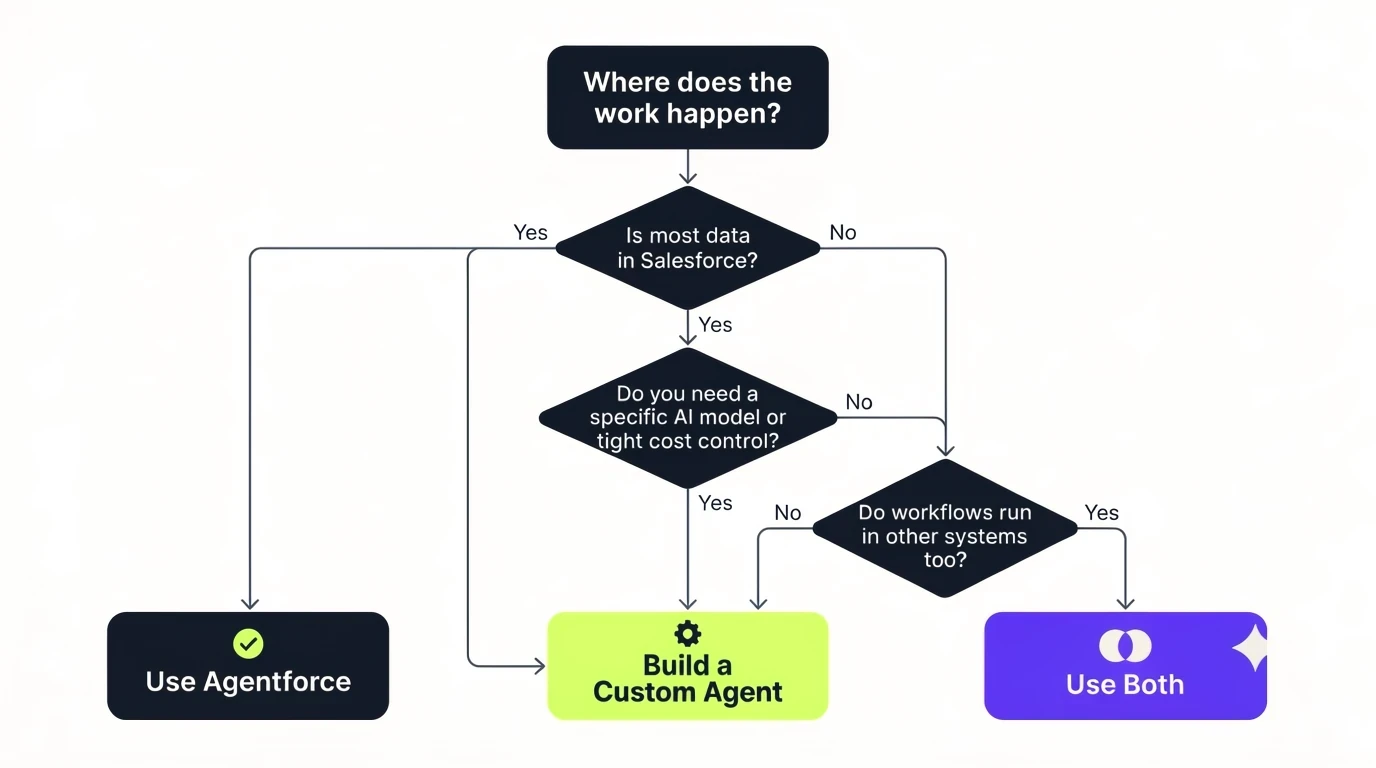
If you are thinking about a custom agent, the main question is where your data and workflows live. Agentforce works best when the work happens inside Salesforce. A custom agent makes more sense when it does not.
Factor | Agentforce | Custom agent |
|---|---|---|
Data outside Salesforce | Possible through integrations, but adds setup | Connects directly to any system or database |
Non-CRM workflows | Limited fit | Built for your exact process |
Model and cost control | Salesforce sets the model options and billing | You choose the model, hosting, and cost setup |
Speed to launch | Faster for CRM tasks | Slower, since you build more yourself |
A simple rule
Choose Agentforce if most of the work uses Salesforce records, such as cases, leads, and orders, and you want a quick launch.
Choose a custom agent if the work depends mostly on other systems, needs a specific model, or needs tight control over cost and data.
Use both if some tasks are in Salesforce and others are not. Many teams start with Agentforce and add a custom agent later.
Here, you can change direction after a small pilot.
Closure Note
The best way to start with Agentforce is small. Pick one task your team repeats every day, check that the data is clean, and set clear limits on what the agent can do. Then test it, measure the results, and add more only when the first agent works. If the work mostly lives outside Salesforce, a custom agent may fit better.
If you want help choosing between the two, Sterling Technolabs’ Salesforce team can review your data and Agentforce use cases, and plan your Agentforce implementation. You can read more about Sterling’s Agentforce implementation services and decide what fits your business.
FAQs
How is Agentforce different from a chatbot?
A chatbot follows scripts and mostly answers questions. Agentforce uses a reasoning engine to plan steps, take actions in Salesforce, and complete tasks from start to finish on its own.
What is the difference in Salesforce Einstein vs Agentforce?
Salesforce Einstein vs Agentforce comes down to the rename. Einstein Copilot was renamed Agentforce Assistant, and Agentforce adds planning and multi-step actions. Einstein still names many other Salesforce AI features, such as predictions, scoring, and the Einstein Trust Layer.
Which Salesforce editions support Agentforce?
Agentforce works with Sales Cloud and Service Cloud on Enterprise Edition or higher. Professional Edition is not eligible in most setups, so check your edition with Salesforce before you plan.
Is there a free version of Agentforce?
Salesforce Foundations gives Enterprise Edition and higher customers a no-cost starting point with Flex Credits and Data Cloud access. It has usage limits, so heavier use will need paid credits.
Does Agentforce need Data Cloud?
Not always. A full Data Cloud setup is not required for a first agent that uses CRM records and knowledge articles. You need it when the agent uses outside data.

Send us your brief. We’ll help turn it into reality
A senior engineer replies within one business day with questions or a first plan: approach, team, timeline and estimate.
:: Keep reading


